Related: Critical CSS: What Render-Blocking Really Means and How Inlining Fixes It covers the related optimization of eliminating render-blocking CSS, which pairs well with resource hint strategy.
The three resource hints (preload, prefetch, preconnect) look similar enough that developers regularly use them interchangeably. They are not interchangeable. Each one tells the browser to do a different thing with a different priority and a different timing. Using preload when you meant prefetch puts a resource in the high-priority queue and competes with CSS and critical JavaScript, potentially making the current page slower while trying to speed up a future page. Getting this wrong is worse than not using resource hints at all.
What this covers: What each hint actually tells the browser, when each one fires in the page lifecycle, the browser’s priority system and how hints fit into it, and concrete examples of when to use each.
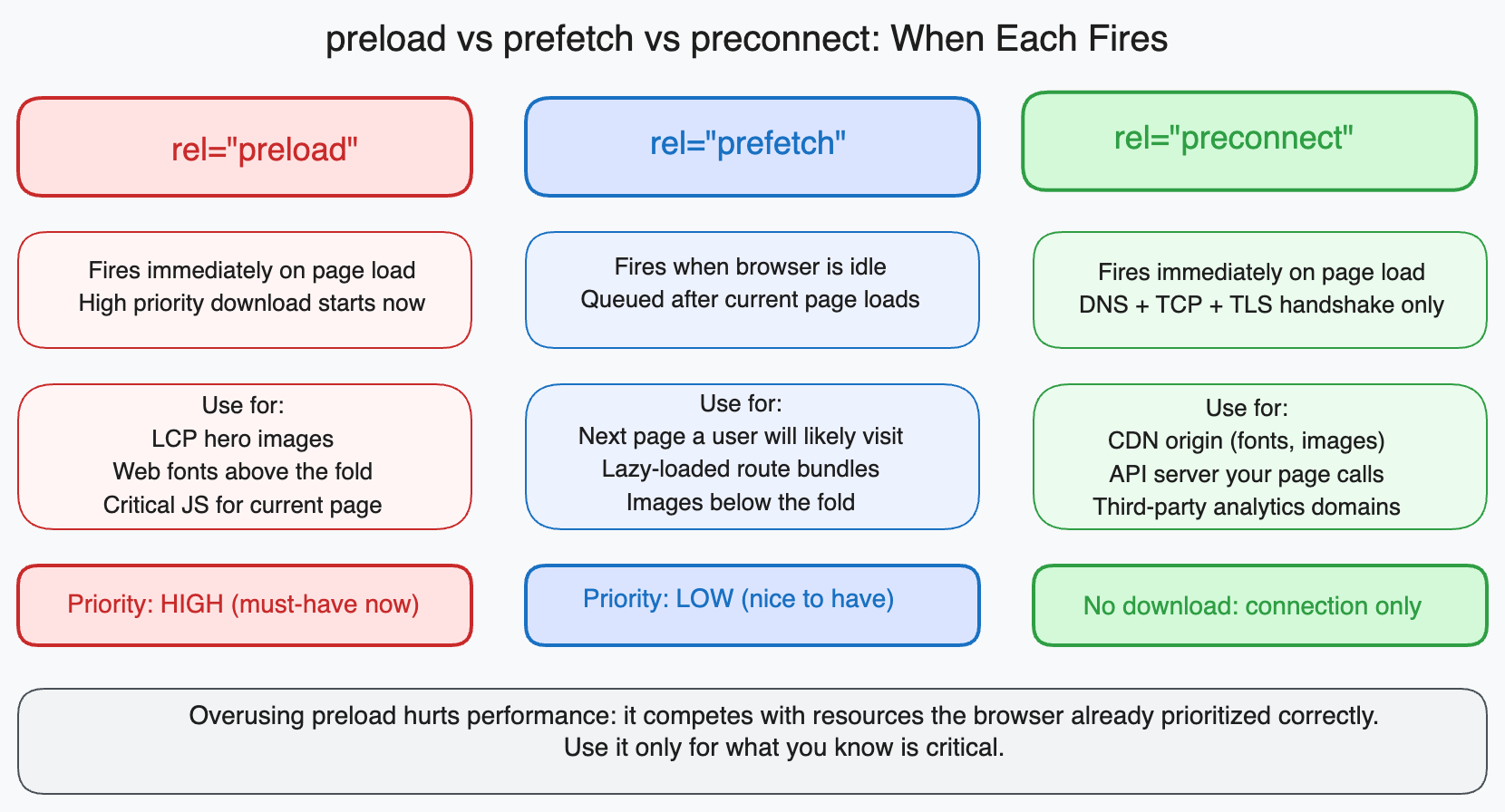
Preload: this page needs this resource soon
preload tells the browser to fetch a specific resource at high priority because the current page will need it soon. It is a declaration of intent for the current page, not a future one.
<head>
  <!-- Preload the LCP image before the HTML parser finds the <img> tag -->
  <link rel="preload" href="/hero.webp" as="image" fetchpriority="high" />

  <!-- Preload a font that is referenced in CSS (CSS would discover it later) -->
  <link rel="preload" href="/fonts/Inter.woff2" as="font" type="font/woff2" crossorigin />

  <!-- Preload a script that will be needed immediately after parsing -->
  <link rel="preload" href="/analytics.js" as="script" />
</head>
The as attribute is required and tells the browser what type of resource is being preloaded. This is critical because different resource types have different priorities and different caching behaviors. Without as, the browser fetches the resource but cannot apply the correct priority, content security policy, or caching headers.
| Resource type | as value |
|---|---|
| JavaScript file | script |
| CSS stylesheet | style |
| Image | image |
| Font | font |
| Video | video |
| Fetch/XHR data | fetch |
The use case for preload: A resource that is on the critical path for the current page but is discovered late by the browser’s preloader. The browser preloader scans HTML as it arrives looking for resources to fetch. It finds <link>, <script>, and <img> tags. It does not execute JavaScript, so it cannot discover resources loaded dynamically. It cannot read CSS to discover the fonts referenced in url(). Preload is how you tell it about resources it would otherwise miss until late in the parse.
The most common correct use: Preloading the LCP image when it is a background image set by CSS (the preloader cannot discover it), preloading fonts that appear in the CSS (the preloader cannot read CSS), and preloading scripts that initialize critical functionality immediately on load.
The most common incorrect use: Preloading resources for other pages (“I’ll preload the dashboard assets on the homepage just in case”). That is what prefetch is for. Misusing preload here gives those assets the same priority as critical CSS and can delay the current page’s first paint.
Prefetch: a future page will probably need this
prefetch tells the browser to fetch a resource that a future navigation might need. It is a low-priority request that runs during browser idle time and does not compete with resources the current page needs.
<head>
  <!-- Hint that the user will probably navigate to the dashboard next -->
  <link rel="prefetch" href="/dashboard.js" as="script" />
  <link rel="prefetch" href="/dashboard.css" as="style" />
</head>
The browser treats prefetch as a background task. On a busy connection, it may delay the prefetch until the current page is fully loaded. On an idle connection, it may start immediately. The browser makes this decision based on network conditions and its own resource scheduling.
Prefetched resources are stored in the browser’s cache with a short TTL. When the user navigates to the page that needs them, the browser finds them in cache and skips the network request entirely.
The use case for prefetch: Predictable navigation paths. You know from analytics that 70% of users who view the homepage proceed to the signup page. Prefetching the signup page’s JavaScript and CSS assets during the homepage’s idle time means those assets are already cached when the user clicks “Sign Up.”
<!-- On the homepage, prefetch signup page assets -->
<link rel="prefetch" href="/signup-bundle.js" as="script" />

<!-- On product listing pages, prefetch checkout assets -->
<link rel="prefetch" href="/checkout-bundle.js" as="script" />
When not to use prefetch: When you are not confident about the next navigation. Prefetching assets that most users will not need wastes bandwidth, particularly on mobile connections where the user may have limited data.
Preconnect: we will talk to this server soon
preconnect tells the browser to establish a connection to an origin before it needs to make any requests to it. Establishing a connection has three steps: DNS lookup, TCP handshake, and TLS negotiation. Together these can take 100 to 500ms depending on the server location and connection quality.
<head>
  <!-- Establish connection to CDN before any requests are made to it -->
  <link rel="preconnect" href="https://cdn.example.com" />

  <!-- Establish connection to Google Fonts so the font request starts faster -->
  <link rel="preconnect" href="https://fonts.googleapis.com" />
  <link rel="preconnect" href="https://fonts.gstatic.com" crossorigin />

  <!-- Establish connection to your API server -->
  <link rel="preconnect" href="https://api.example.com" />
</head>
preconnect does not fetch anything. It just performs the handshake. When the actual request to that origin comes (because the browser encountered a font URL in CSS, or your JavaScript fetched from the API), the connection is already established and the request goes straight to data transfer.
The crossorigin attribute is required for connections to origins that will serve resources requested with CORS (such as fonts). Without crossorigin, the browser establishes an anonymous connection, but the actual font request is a CORS request that requires credentials, so the browser has to establish a second connection. Two handshakes instead of one.
The use case for preconnect: Any third-party origin that serves resources critical to the current page. Google Fonts, analytics providers, CDN origins for your static assets, API endpoints that your application calls on load.
The timing advantage: The browser discovers third-party origins by reading your HTML, CSS, and JavaScript. It cannot preconnect until it encounters the URL. With preconnect in the document head, the connection starts before HTML parsing is even complete. Google’s Lighthouse team measured typical savings of 100 to 300ms on FCP for pages with third-party fonts and CDN assets.
dns-prefetch: preconnect’s less aggressive sibling
dns-prefetch does only the DNS lookup, skipping the TCP handshake and TLS negotiation.
<link rel="dns-prefetch" href="https://api.example.com" />
Use dns-prefetch for third-party origins that you know the page will talk to but that are not on the critical path for initial render. The DNS lookup (20 to 120ms) is still saved, but you avoid keeping a TCP connection open for a server the page might not talk to for several seconds.
For origins that are on the critical path, preconnect is better. For origins that are used later in the page’s lifetime (analytics, chat widgets, lazy-loaded components), dns-prefetch is the appropriate hint.
fetchpriority: priority signaling within a resource type
fetchpriority is a newer attribute that works alongside preload, not as a separate hint. It lets you tell the browser the relative priority of resources within the same type.
<!-- Tell the browser this is the most important image -->
<img
  src="/hero.webp"
  fetchpriority="high"
  loading="eager"
  alt="Hero"
/>

<!-- Mark lower-priority images that can wait -->
<img
  src="/thumbnail.webp"
  fetchpriority="low"
  loading="lazy"
  alt="Thumbnail"
/>
<!-- For preloaded LCP images: add fetchpriority to the preload link too -->
<link
  rel="preload"
  href="/hero.webp"
  as="image"
  fetchpriority="high"
/>
Without fetchpriority, the browser assigns image priority based on its position in the document and whether it is in the viewport. For the LCP image, the browser often gets this right. But when the LCP image is loaded dynamically via JavaScript, or when it appears below several other images in the HTML, the browser might assign it a lower priority than it deserves. fetchpriority="high" overrides this.
Putting it together: a real page example
Here is what a well-instrumented <head> looks like for a content-heavy site with a hero image, a custom font, and a CDN for assets:
<head>
  <meta charset="UTF-8" />
  <meta name="viewport" content="width=device-width, initial-scale=1" />

  <!-- 1. Preconnect to third-party origins on the critical path -->
  <link rel="preconnect" href="https://fonts.googleapis.com" />
  <link rel="preconnect" href="https://fonts.gstatic.com" crossorigin />
  <link rel="preconnect" href="https://cdn.example.com" />

  <!-- 2. Preload the LCP image (hero) -->
  <link
    rel="preload"
    href="https://cdn.example.com/hero.webp"
    as="image"
    fetchpriority="high"
  />

  <!-- 3. Load CSS -->
  <link rel="stylesheet" href="https://fonts.googleapis.com/css2?family=Inter:wght@400;600" />
  <link rel="stylesheet" href="/styles/main.css" />

  <!-- 4. Prefetch assets for the most common next page -->
  <link rel="prefetch" href="/dashboard.js" as="script" />

  <!-- 5. DNS prefetch for non-critical third-party origins -->
  <link rel="dns-prefetch" href="https://analytics.example.com" />
</head>
The order matters: preconnects first so connection establishment starts as early as possible, then preloads for current-page critical resources, then the actual <link> and <script> tags, then prefetches for future pages, then dns-prefetch for non-critical origins.
The mistake that costs the most
Preloading resources that the page does not use is the most expensive error. The browser fetches the preloaded resource at high priority, competing with your CSS and render-critical JavaScript. If the resource is never used on the current page, Lighthouse will warn:
Unused preload: /dashboard.js was preloaded but not used within 3 seconds
This unused preload consumed bandwidth and network priority for nothing. It is strictly worse than not having the hint at all.
Before adding a preload hint, verify that the resource is used on the current page and that it is on the critical path (meaning the user sees something broken or unstyled without it). If it meets both conditions, preload it. If it is for a future page, use prefetch. If you just need to warm up a connection, use preconnect.