
Heavy CPU work — parsing large binary files, sorting 50,000 records, running ML inference — belongs on a separate thread, not the main thread. The main thread has one job: keep the UI responsive. Every millisecond it spends on computation: a millisecond it cannot spend processing input events or painting frames.
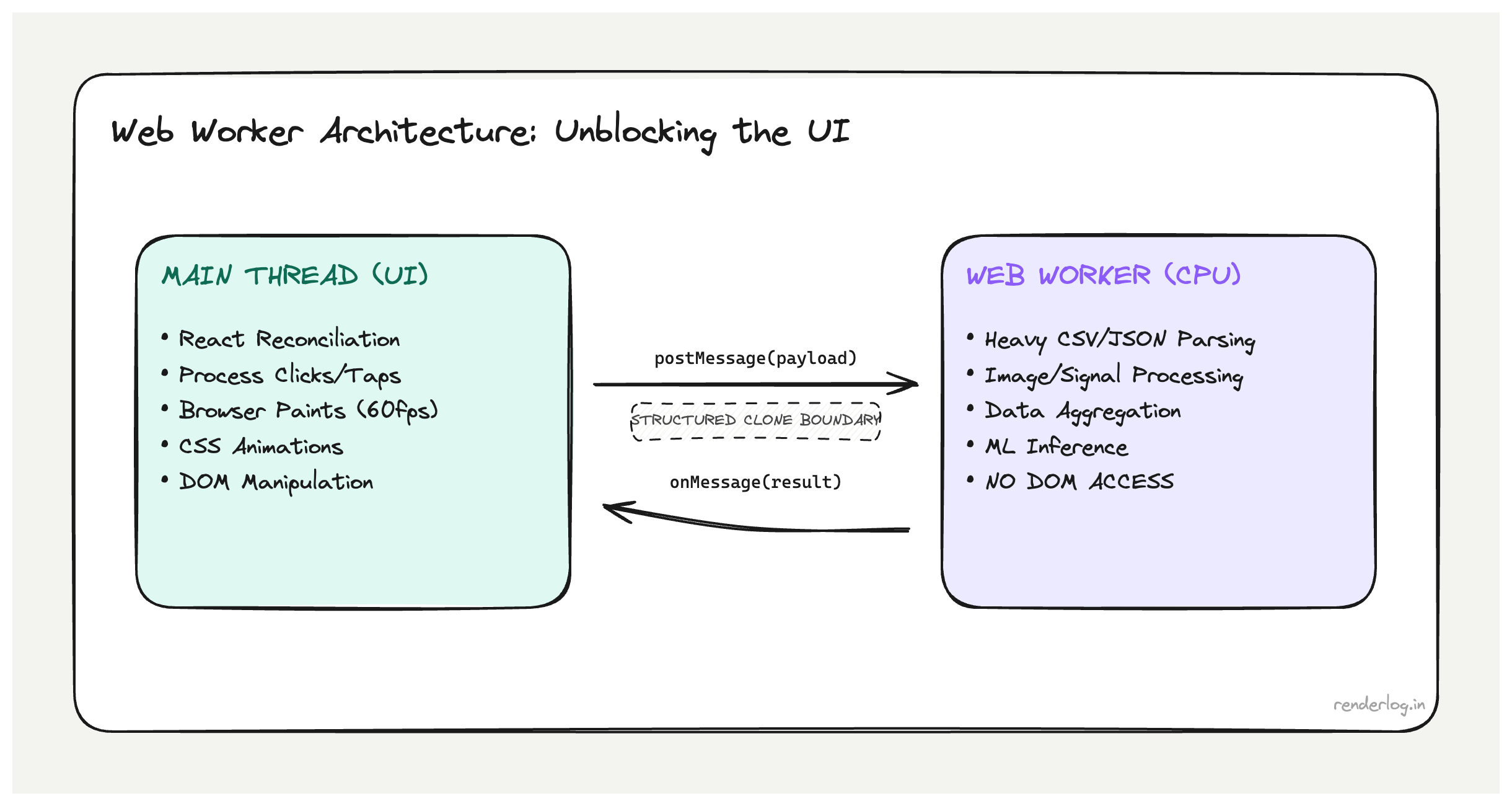
What Web Workers give you: JavaScript running in a separate OS thread, completely isolated from the main thread’s event loop. While the worker processes data, the main thread handles clicks, renders frames, and runs React’s reconciler, unblocked.
What this covers: The Worker communication model and structured clone limits, when Workers help vs when they don’t, Comlink for ergonomic async APIs: the React custom hook pattern for Worker lifecycle management, Worker pools, and OffscreenCanvas (rendering off-thread).
What Web Workers actually are
A Web Worker is JavaScript running in a separate OS thread from the browser’s main thread. It has its own global scope (self instead of window), its own event loop, and cannot directly access the DOM, document, window, or any browser APIs that require the main thread.
The communication model is message passing: the main thread and the worker communicate by calling postMessage() and listening to message events. The data passed between them is structured cloned serialized into a binary format and deserialized on the other side. No shared memory by default.
// main.js
const worker = new Worker(new URL("./my-worker.js", import.meta.url));

worker.postMessage({ type: "PARSE", payload: rawData });

worker.addEventListener("message", (event) => {
  const { result } = event.data;
  setProcessedData(result);
});

// my-worker.js
self.addEventListener("message", (event) => {
  const { type, payload } = event.data;

  if (type === "PARSE") {
    const result = heavyParseFunction(payload);
    self.postMessage({ result });
  }
});
The worker runs heavyParseFunction in its own thread. The main thread is free to handle user events, paint frames, and run React’s reconciler while the work happens.
The structured clone algorithm: what can cross the boundary
Not everything can be passed to a Worker via postMessage. The structured clone algorithm defines what’s serializable. Understanding its limits saves debugging time.
What can be cloned:
- Primitives (
string,number,boolean,null,undefined,BigInt) - Arrays and plain objects (deeply nested, recursively)
Map,Set,Date,RegExpArrayBuffer,TypedArray(Uint8Array,Float32Array, etc.)Blob,File,ImageDataMessagePort(via transfer, not clone)
What cannot be cloned:
- Functions (cannot be serialized this is a fundamental limit)
- DOM nodes or element references
Proxyobjects- Objects with circular references (will throw)
- Class instances with custom prototypes (only own enumerable properties are cloned, prototype chain is lost)
// This will throw  functions can't be cloned
worker.postMessage({ callback: () => console.log("hi") }); // DataCloneError

// This works  plain data
worker.postMessage({ data: [1, 2, 3], config: { threshold: 0.5 } });
Transferable objects are a different mechanism: instead of cloning data, you transfer ownership. The sending side loses access; the receiver gains it. This is zero-copy and critical for large buffers.
const buffer = new ArrayBuffer(1024 * 1024 * 10); // 10MB
// Transfer the buffer  main thread can no longer access it
worker.postMessage({ buffer }, [buffer]);
ArrayBuffer, MessagePort, OffscreenCanvas, ImageBitmap, and ReadableStream are all transferable.
CPU-bound vs I/O-bound: the right use cases
The mistake I see most often is reaching for Workers for the wrong kind of work.
Web Workers help with CPU-bound tasks work where the CPU is the bottleneck, computation takes significant wall-clock time, and the result can be returned asynchronously:
| Good Worker candidate | Why |
|---|---|
| Parsing large CSV/JSON/binary files | Pure CPU, no DOM needed |
| Image processing (resizing, filtering, color transforms) | Pixel math is CPU-intensive |
| Cryptographic operations (hashing, encryption) | Compute-heavy, available via crypto.subtle in workers |
| Data compression/decompression | CPU-bound, libraries like pako work in workers |
Machine learning inference (onnxruntime-web, transformers.js) | Matrix math is exactly what workers are for |
| Sorting/filtering/aggregating large datasets | Heavy transforms on thousands of records |
Workers don’t help with I/O-bound tasks:
| Bad Worker candidate | Why |
|---|---|
fetch calls | fetch is non-blocking on the main thread already; async/await handles this |
| Waiting for user input | No DOM access in workers |
| Updating React state | You still have to postMessage back to main thread; the bottleneck is in the message handler |
| Fast, small computations | Worker setup cost + clone overhead exceeds the computation time |
The test: if your operation would be fast but for the raw CPU cycles it consumes, a Worker will help. If it’s slow because it’s waiting for network or disk, a Worker adds overhead without solving anything.
Worker lifecycle management
Workers have a lifecycle: you create them, communicate with them, and eventually terminate them. Forgetting to terminate workers is a memory leak.
// Create
const worker = new Worker(new URL("./parser.worker.js", import.meta.url));

// Communicate
worker.postMessage(data);
worker.addEventListener("message", handler);

// Terminate when done
worker.terminate();

// Error handling
worker.addEventListener("error", (event) => {
  console.error("Worker error:", event.message, event.filename, event.lineno);
});

worker.addEventListener("messageerror", (event) => {
  console.error("Failed to deserialize message from worker:", event);
});
Unhandled exceptions inside a worker fire the error event on the worker object in the main thread. The worker continues running after an error unless you call terminate(). Errors inside workers don’t propagate to window.onerror you must handle them explicitly.
Comlink: making Workers feel like normal async functions
The raw postMessage API gets verbose fast. You end up building a request/response protocol with message types, correlation IDs, and manual promise management. Comlink (a small Google library) abstracts all of that into a clean async function interface.
// parser.worker.js
import * as Comlink from "comlink";

const api = {
  async parseCSV(csvString) {
    // heavy parsing work
    return parsedRows;
  },

  async transformData(rows, config) {
    // heavy transformation
    return transformedRows;
  },
};

Comlink.expose(api);
// main thread
import * as Comlink from "comlink";

const worker = new Worker(new URL("./parser.worker.js", import.meta.url));
const api = Comlink.wrap(worker);

// Feels like a regular async call  no postMessage, no event listeners
const rows = await api.parseCSV(csvString);
const transformed = await api.transformData(rows, { threshold: 0.5 });
Comlink handles the message correlation, promise wrapping, and error propagation under the hood. The result is Worker code that reads like normal async JavaScript.
The limitation: Comlink’s proxy still relies on structured clone, so your function arguments and return values must be serializable. You can use Comlink.transfer() to pass Transferable objects explicitly.
Vite/webpack integration
Modern bundlers handle Worker imports natively. In Vite, the new URL pattern is the standard:
// Vite: recognized as a Worker by the bundler
const worker = new Worker(
  new URL("./heavy-computation.worker.js", import.meta.url),
  { type: "module" } // enables ES module syntax in the worker
);
Vite bundles the worker file separately, handles its imports, and outputs a separate chunk. The worker can import npm packages normally.
For Webpack 5, workers are similarly first-class:
// Webpack 5: same URL pattern
const worker = new Worker(new URL("./worker.js", import.meta.url));
Avoid the older string-URL pattern (new Worker("/worker.js")) in modern builds it bypasses the bundler and forces you to manually manage the worker file in your public directory.
React integration: custom hook wrapping a Worker
The cleanest pattern for using a Worker in React is a custom hook that manages the Worker lifecycle and exposes a simple async interface.
// useCSVParser.js
import { useEffect, useRef, useCallback } from "react";
import * as Comlink from "comlink";

export function useCSVParser() {
  const workerRef = useRef(null);
  const apiRef = useRef(null);

  useEffect(() => {
    const worker = new Worker(
      new URL("./csv-parser.worker.js", import.meta.url),
      { type: "module" }
    );
    workerRef.current = worker;
    apiRef.current = Comlink.wrap(worker);

    return () => {
      worker.terminate();
      workerRef.current = null;
      apiRef.current = null;
    };
  }, []);

  const parseCSV = useCallback(async (csvString) => {
    if (!apiRef.current) throw new Error("Worker not initialized");
    return apiRef.current.parseCSV(csvString);
  }, []);

  return { parseCSV };
}
// Component using the hook
function DataUploader() {
  const { parseCSV } = useCSVParser();
  const [rows, setRows] = useState([]);
  const [isParsing, setIsParsing] = useState(false);

  async function handleFileUpload(file) {
    setIsParsing(true);
    try {
      const text = await file.text();
      const parsed = await parseCSV(text); // runs in worker thread
      setRows(parsed);
    } finally {
      setIsParsing(false);
    }
  }

  return (
    <div>
      <input type="file" accept=".csv" onChange={e => handleFileUpload(e.target.files[0])} />
      {isParsing && <p>Parsing {/* spinner */}</p>}
      {rows.length > 0 && <DataTable rows={rows} />}
    </div>
  );
}
The useEffect cleanup calls worker.terminate() critical for preventing memory leaks when the component unmounts.
Worker pools for parallelism
A single Worker runs one task at a time. If you have multiple independent tasks, a Worker pool lets you run them in parallel across multiple Worker instances.
// Simple worker pool
class WorkerPool {
  constructor(workerUrl, size = navigator.hardwareConcurrency || 4) {
    this.workers = Array.from(
      { length: size },
      () => Comlink.wrap(new Worker(workerUrl, { type: "module" }))
    );
    this.index = 0;
  }

  // Round-robin dispatch
  getWorker() {
    const worker = this.workers[this.index];
    this.index = (this.index + 1) % this.workers.length;
    return worker;
  }

  async run(method, ...args) {
    return this.getWorker()[method](...args);
  }

  terminate() {
    this.workers.forEach(w => Comlink.releaseProxy(w));
  }
}
navigator.hardwareConcurrency returns the number of logical CPU cores. Using it as the pool size avoids over-subscribing the CPU. On a 4-core machine, 4 workers can genuinely run in parallel; 16 workers won’t be faster, just more memory-hungry.
OffscreenCanvas: rendering off the main thread
OffscreenCanvas lets you do canvas rendering (charts, WebGL scenes, image processing) entirely in a Worker. You transfer the canvas to the worker and it renders directly no main-thread involvement after the initial transfer.
// main.js
const canvas = document.getElementById("chart-canvas");
const offscreen = canvas.transferControlToOffscreen();
const worker = new Worker(new URL("./chart-worker.js", import.meta.url));

// Transfer ownership  main thread can no longer access the canvas
worker.postMessage({ canvas: offscreen }, [offscreen]);

// chart-worker.js
self.addEventListener("message", ({ data }) => {
  const { canvas } = data;
  const ctx = canvas.getContext("2d");

  // Draw whatever you want  this runs off the main thread
  function draw() {
    // ... heavy chart rendering
    requestAnimationFrame(draw); // yes, rAF works in workers with OffscreenCanvas
  }
  draw();
});
This is particularly useful for live-updating charts (trading data, metrics dashboards) where the chart render work is expensive enough to cause jank on the main thread.
SharedArrayBuffer and Atomics
SharedArrayBuffer enables true shared memory between the main thread and workers no cloning, no transfer. Both threads read and write the same memory region.
// main.js
const sharedBuffer = new SharedArrayBuffer(4 * 1024); // 4KB
const sharedArray = new Int32Array(sharedBuffer);

worker.postMessage({ buffer: sharedBuffer });

// worker.js
self.addEventListener("message", ({ data }) => {
  const array = new Int32Array(data.buffer);
  // Both main thread and worker can now read/write array
  Atomics.store(array, 0, 42);
});
Atomics provides atomic operations (compare-and-swap, load, store, wait/notify) for coordinating access to shared memory without data races.
The catch: SharedArrayBuffer requires cross-origin isolation headers on your server:
Cross-Origin-Opener-Policy: same-origin
Cross-Origin-Embedder-Policy: require-corp
These headers limit what can be embedded in your page (no arbitrary cross-origin iframes or images without explicit CORP headers), which is a meaningful constraint for apps with third-party integrations.
SharedArrayBuffer is the right tool for high-throughput real-time scenarios streaming telemetry, audio processing, game physics where the clone overhead of postMessage is itself a bottleneck. For most application use cases, structured clone is fast enough.
Before/after: moving CSV parsing to a Worker
Here’s the concrete impact of moving a 50,000-row CSV transform to a Worker.
Before (main thread):
Main thread task: 1,847ms
  ├── CSV string parse: 340ms
  ├── Row validation: 420ms
  ├── Data normalization: 680ms
  └── Aggregation: 407ms

Result: Input frozen, no frames painted, spinner doesn't spin
After (Worker):
Main thread task: 12ms (postMessage + state update)
Worker thread: 1,847ms (same work, different thread)

Result: Input responsive, spinner animates, results arrive async
The total computation time didn’t change. But the user experience went from “frozen app” to “responsive app with an async operation in progress.” That’s the entire value proposition of Web Workers.
| Metric | Before | After |
|---|---|---|
| Main thread block time | 1,847ms | ~12ms |
| User input response | Frozen | Immediate |
| Spinner animation | Stutters | Smooth |
| Total computation time | 1,847ms | 1,847ms (in worker) |
| Bundle complexity | None | Worker file + Comlink |