Related: Network Optimization for SPAs and React Apps covers the broader network optimization picture including HTTP caching and API request optimization.
A service worker is a JavaScript file that runs in a background thread, separate from your main application. It intercepts every network request your page makes and can respond from cache, modify the request, or let it pass through to the network unchanged. For a returning visitor, a well-configured service worker means many requests never touch the network at all. The page loads from cache at local disk speed.
What this covers: What service workers can and cannot do, the three core caching strategies (cache-first, network-first, stale-while-revalidate), when each strategy is correct for which resource type, and how Workbox makes implementing these strategies practical without writing the interception logic by hand.
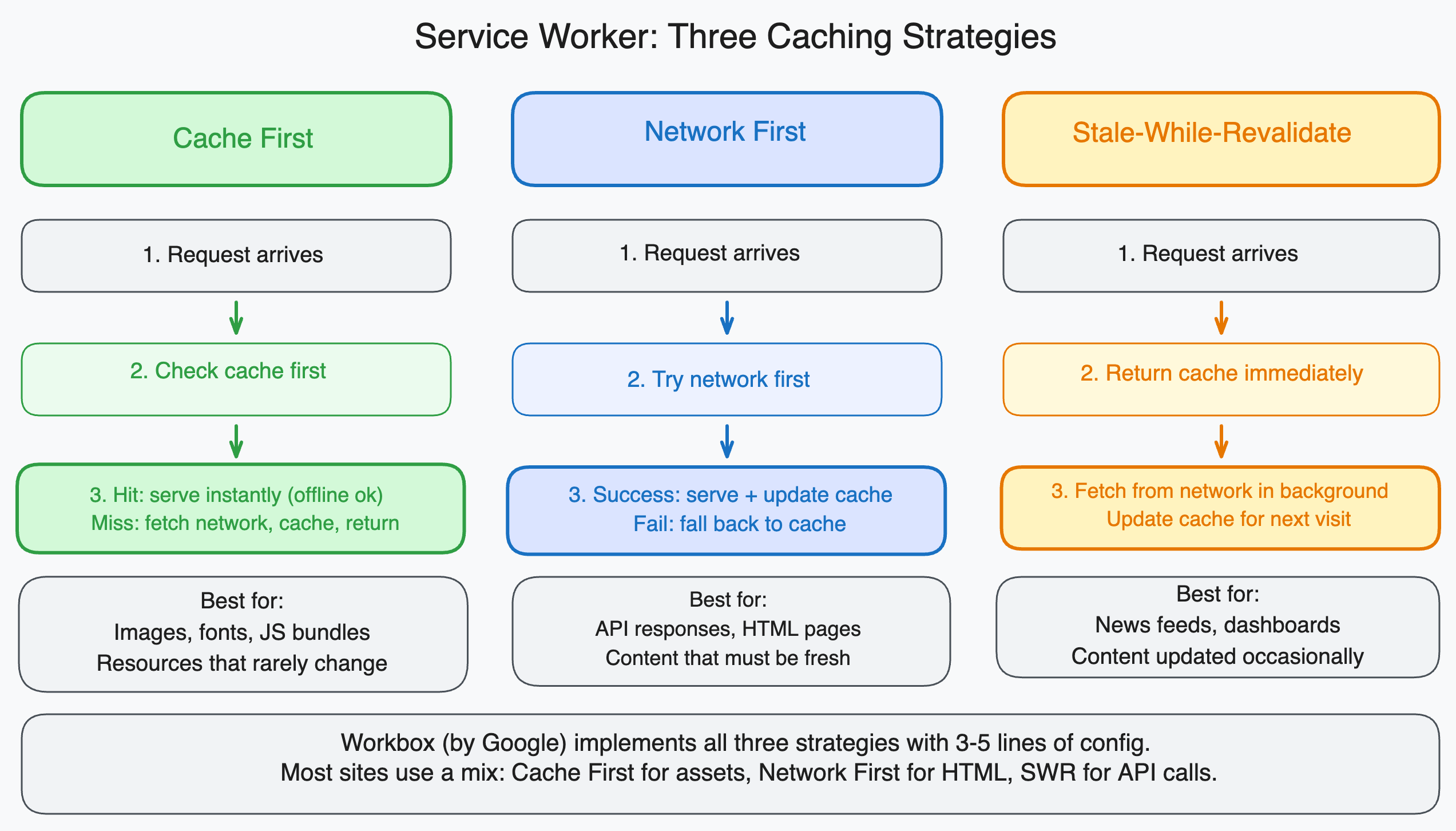
What a service worker actually does
A service worker is registered by your application JavaScript and installed by the browser. Once installed, it intercepts all network requests made from pages on its origin. This includes requests for HTML, CSS, JavaScript, images, fonts, and API calls.
// Register the service worker from your main application
if ('serviceWorker' in navigator) {
  window.addEventListener('load', () => {
    navigator.serviceWorker.register('/sw.js');
  });
}
The service worker file (sw.js) runs in a separate worker thread. It has access to the Cache Storage API, which is separate from the HTTP cache the browser manages automatically. The Cache Storage API is under your complete control: you decide what to cache, when to cache it, how long to keep it, and when to delete it.
// Inside sw.js: intercept a fetch event and respond from cache
self.addEventListener('fetch', event => {
  event.respondWith(
    caches.match(event.request).then(cachedResponse => {
      if (cachedResponse) {
        return cachedResponse; // Serve from cache
      }
      return fetch(event.request); // Fall through to network
    })
  );
});
This is the basic cache-first pattern in raw form. Every real application needs more nuance: what if the cache is stale? What if certain resources should never be served from cache? What if the network is unavailable? Writing and maintaining all of this logic by hand is error-prone, which is why Workbox exists.
Strategy 1: Cache-First
Cache-first means: check the cache first. If a response is in cache, return it immediately without hitting the network. Only go to the network if the resource is not in cache.
Use this for: Versioned static assets. JavaScript bundles, CSS files, images, and fonts that have content hashes in their filenames (main-a1b2c3.js). When the content changes, the filename changes, so cached versions are never stale. The old cache entry becomes unreachable by the new URL and gets cleaned up during the next cache update.
Why it works for these resources: Versioned assets are safe to serve from cache forever because the filename is tied to the content. A browser serving main-a1b2c3.js from cache in six months will serve the exact same content that was served when the file was first cached. The application code that requests this file will either request the cached version (nothing changed) or request a different URL (the content changed and the new build output has a new hash).
// Workbox: cache-first for all versioned assets
import { CacheFirst } from 'workbox-strategies';
import { registerRoute } from 'workbox-routing';

registerRoute(
  // Match hashed JavaScript and CSS files
  ({ request, url }) =>
    request.destination === 'script' ||
    request.destination === 'style',
  new CacheFirst({
    cacheName: 'static-assets',
    plugins: [
      new ExpirationPlugin({
        maxAgeSeconds: 365 * 24 * 60 * 60, // 1 year
        maxEntries: 60,
      }),
    ],
  })
);
What to avoid: Using cache-first for HTML documents or unversioned API endpoints. If your HTML is served from cache and you deploy a new version, users will continue loading the old HTML until the cache expires. HTML should use network-first or stale-while-revalidate so users always get current navigation and content structure.
Strategy 2: Network-First
Network-first means: try the network first. If the network succeeds, serve the response and update the cache. If the network fails (offline, timeout, server error), fall back to the cached version.
Use this for: HTML pages, API endpoints serving fresh data, and any resource where stale content would cause problems. The user always gets the freshest version when online. When offline, they get a reasonable fallback from cache.
// Workbox: network-first for HTML pages
import { NetworkFirst } from 'workbox-strategies';
import { registerRoute } from 'workbox-routing';

registerRoute(
  ({ request }) => request.mode === 'navigate', // HTML navigation requests
  new NetworkFirst({
    cacheName: 'pages',
    networkTimeoutSeconds: 3, // Fall back to cache if network takes more than 3 seconds
    plugins: [
      new ExpirationPlugin({
        maxEntries: 50,
        maxAgeSeconds: 30 * 24 * 60 * 60, // Keep cached pages for 30 days
      }),
    ],
  })
);
The networkTimeoutSeconds option is important for offline-capable applications. Without it, network-first will wait indefinitely for a network response even when the user is offline, only falling back to cache after the connection eventually times out (which can take 30-60 seconds). Setting a 3-second timeout means users in poor network conditions get a cached response quickly.
For API endpoints serving user-specific or time-sensitive data:
// Workbox: network-first for API calls
registerRoute(
  ({ url }) => url.pathname.startsWith('/api/'),
  new NetworkFirst({
    cacheName: 'api-responses',
    networkTimeoutSeconds: 5,
    plugins: [
      new ExpirationPlugin({
        maxEntries: 100,
        maxAgeSeconds: 24 * 60 * 60, // Cache API responses for 1 day
      }),
    ],
  })
);
The cached API response is not perfectly fresh, but for most use cases it is better than showing an error page when the network is unavailable.
Strategy 3: Stale-While-Revalidate
Stale-while-revalidate means: serve the cached version immediately (stale), and simultaneously fetch a fresh version from the network in the background (revalidate). The next request gets the fresh version.
Use this for: Resources where some staleness is acceptable and speed is more important than absolute freshness. Navigation assets that change infrequently, avatar images, icon sets, and any resource where showing a slightly old version on the current visit is fine as long as the next visit gets the update.
// Workbox: stale-while-revalidate for images
import { StaleWhileRevalidate } from 'workbox-strategies';

registerRoute(
  ({ request }) => request.destination === 'image',
  new StaleWhileRevalidate({
    cacheName: 'images',
    plugins: [
      new ExpirationPlugin({
        maxEntries: 60,
        maxAgeSeconds: 30 * 24 * 60 * 60, // 30 days
      }),
    ],
  })
);
The user experience for stale-while-revalidate: on the first visit, there is no cache, so the image loads from the network normally. On subsequent visits, the cached image appears instantly. In the background, the service worker fetches a fresh version from the network. If the image changed, the fresh version replaces the cached version. On the visit after that, the updated image appears instantly.
Why this is powerful for most non-critical resources: Users almost never notice if an avatar image or icon set is one version old. What they notice is speed. Stale-while-revalidate gives them cache speed on every visit while keeping the cache reasonably fresh.
Precaching: caching at install time
All three strategies above are runtime caching: resources get cached when the user visits pages that request them. Precaching is different: you tell Workbox which resources to cache immediately when the service worker installs, before the user has visited any page.
Precaching is used for the application shell: the minimal HTML, CSS, and JavaScript needed to render a working (possibly empty) UI. When the user opens the app, even before any network requests complete, the service worker serves the precached shell and the app renders immediately.
// Workbox: precache the app shell at install time
import { precacheAndRoute } from 'workbox-precaching';

// This list is generated by Workbox at build time (via workbox-build or the Vite plugin)
// It contains all files from your build output with their content hashes
precacheAndRoute(self.__WB_MANIFEST);
The self.__WB_MANIFEST placeholder is replaced at build time by the Workbox build tool with an array of all your static assets and their content hashes. When a user installs the service worker for the first time, Workbox fetches all these assets and caches them. On subsequent visits, they are served from cache instantly.
Setting up Workbox in a Vite project
The easiest setup for modern projects uses the vite-plugin-pwa plugin, which integrates Workbox configuration into the Vite build process:
// vite.config.ts
import { VitePWA } from 'vite-plugin-pwa';

export default {
  plugins: [
    VitePWA({
      registerType: 'autoUpdate',
      workbox: {
        // Precache all files matching these patterns from the build output
        globPatterns: ['**/*.{js,css,html,ico,png,webp,svg,woff2}'],

        // Runtime caching rules
        runtimeCaching: [
          // Cache-first for versioned assets
          {
            urlPattern: /\.(?:js|css)$/,
            handler: 'CacheFirst',
            options: {
              cacheName: 'static-resources',
              expiration: {
                maxAgeSeconds: 365 * 24 * 60 * 60,
              },
            },
          },
          // Network-first for API calls
          {
            urlPattern: /^https:\/\/api\.example\.com\//,
            handler: 'NetworkFirst',
            options: {
              cacheName: 'api-cache',
              networkTimeoutSeconds: 5,
              expiration: {
                maxEntries: 200,
                maxAgeSeconds: 24 * 60 * 60,
              },
            },
          },
          // Stale-while-revalidate for images
          {
            urlPattern: /\.(?:png|jpg|webp|svg|gif)$/,
            handler: 'StaleWhileRevalidate',
            options: {
              cacheName: 'images',
              expiration: {
                maxEntries: 100,
                maxAgeSeconds: 30 * 24 * 60 * 60,
              },
            },
          },
        ],
      },
    }),
  ],
};
This configuration handles the most common case: versioned JavaScript and CSS with cache-first, API responses with network-first and a 5-second fallback timeout, and images with stale-while-revalidate.
What service workers cannot cache
Opaque responses. Requests to third-party origins without CORS headers return “opaque” responses. Opaque responses can be cached, but their size is counted as 7MB regardless of actual size due to security restrictions. Caching too many opaque responses can exhaust cache storage limits.
Range requests. Video streaming uses HTTP range requests to fetch specific byte ranges. Service workers can intercept these, but handling them correctly requires specific logic. The default Workbox strategies do not handle range requests.
Resources requiring authentication in every request. If a resource requires a fresh token in each request and you cannot cache the token, you cannot meaningfully cache the resource either.
The return visit experience
After a service worker is installed and caching is running correctly, a returning visitor’s experience is qualitatively different from a first visit:
- User opens the app
- Service worker intercepts navigation request
- Precached
index.htmlreturns instantly from service worker cache - Browser parses HTML, requests JavaScript and CSS
- Service worker intercepts those requests, returns from cache instantly
- App renders with no network requests at all
- In background, service worker fetches fresh API data
- UI updates with fresh data when background fetch completes
Steps 1 through 6 complete in under 100ms on most devices, regardless of network speed, because no network requests were made. The perceived load time is the time to render from cache, not the time to fetch from a server.
This is the correct mental model for why service workers matter: not as a way to make network requests faster, but as a way to eliminate network requests entirely for everything that can safely be served from cache.