Related: JavaScript Bundle Analysis: Tree Shaking and Code Splitting Explained covers how bundlers construct module graphs and where tree shaking fails, which is the foundation for understanding what code splitting actually does.
The size of your JavaScript bundle is not the number that matters for first load. What matters is how much of that bundle is needed to render the page the user actually landed on. A 5MB React application where the user landed on the marketing homepage might need 80KB to show that page. The other 4.92MB is code for routes the user has not visited and may never visit. React.lazy() is how you stop shipping those 4.92MB on first load.
What this covers: What React.lazy() does to the bundle at build time, how Suspense fits into the loading flow, how to confirm the split actually happened, the cases where it silently fails, and the preloading pattern that prevents waterfall fetches on navigation.
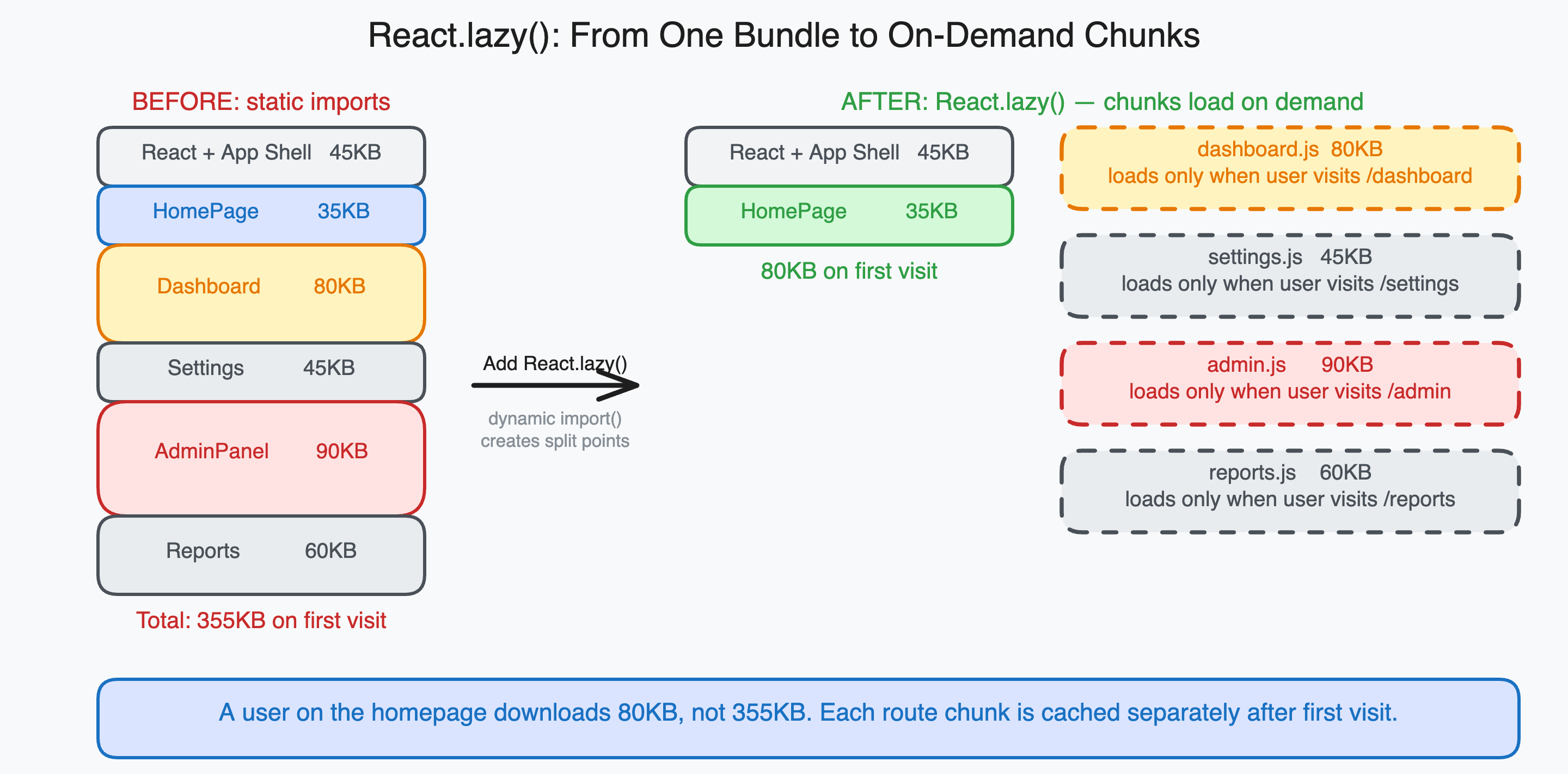
What React.lazy() does to the bundle
React.lazy() takes a function that returns a dynamic import(). The key word is dynamic. A static import at the top of a file is analyzed at build time and the imported module is included in the same output chunk. A dynamic import is a split point: the bundler creates a separate output chunk containing the dynamically imported module and all of its unique dependencies.
// Static import: Dashboard ends up in the same chunk as App
import Dashboard from './pages/Dashboard';

// Dynamic import with React.lazy(): Dashboard becomes a separate chunk
const Dashboard = lazy(() => import('./pages/Dashboard'));
When you switch from a static import to React.lazy(), your bundler (Vite, Webpack, or otherwise) creates a new file in the build output. Instead of one bundle, you get the main bundle plus a chunk file specifically for Dashboard and everything it imports that is not already in the main bundle.
The main bundle shrinks by the size of Dashboard and its unique dependencies. The Dashboard chunk is downloaded on demand when the user navigates to the dashboard route.
import { lazy, Suspense } from 'react';
import { Routes, Route } from 'react-router-dom';

const Home = lazy(() => import('./pages/Home'));
const Dashboard = lazy(() => import('./pages/Dashboard'));
const Settings = lazy(() => import('./pages/Settings'));
const AdminPanel = lazy(() => import('./pages/AdminPanel'));

function App() {
  return (
    <Suspense fallback={<PageLoader />}>
      <Routes>
        <Route path="/" element={<Home />} />
        <Route path="/dashboard" element={<Dashboard />} />
        <Route path="/settings" element={<Settings />} />
        <Route path="/admin" element={<AdminPanel />} />
      </Routes>
    </Suspense>
  );
}
In this setup, a user who lands on / downloads the main bundle plus the Home chunk. They do not download anything for Dashboard, Settings, or AdminPanel until they navigate to those routes.
How Suspense fits in
React.lazy() by itself will throw an error if you try to render the component before its chunk has loaded. Suspense catches that error and shows a fallback UI while the chunk downloads.
The mechanics: when React tries to render a lazy component and the chunk is not yet loaded, the component throws a Promise. Suspense catches the thrown Promise and renders the fallback. When the Promise resolves (the chunk has downloaded), Suspense re-renders the tree with the actual component.
This is the same Suspense boundary you would use for data fetching. The behavior is identical: throw a Promise to signal “not ready,” catch it at the nearest Suspense boundary, show fallback while waiting, render real content when ready.
// Suspense can wrap individual routes or the entire app
// Wrapping the whole app is simpler; wrapping per-route allows per-route fallbacks

// Per-route fallbacks (more control):
function App() {
  return (
    <Routes>
      <Route
        path="/"
        element={
          <Suspense fallback={<HomeLoader />}>
            <Home />
          </Suspense>
        }
      />
      <Route
        path="/dashboard"
        element={
          <Suspense fallback={<DashboardLoader />}>
            <Dashboard />
          </Suspense>
        }
      />
    </Routes>
  );
}
For most applications, a single Suspense boundary around all routes is simpler and sufficient. The fallback can be a generic page loader or even null if you prefer a blank transition. The key constraint is that the Suspense boundary must be an ancestor of the lazy component in the React tree.
Verifying the split actually happened
The most common mistake with code splitting is thinking you have done it when you have not. Before assuming a React.lazy() conversion worked, verify it.
Method 1: Check the build output. Run npm run build and look at the output files. A successful route split produces separate chunk files:
dist/assets/index-a1b2c3.js       (main bundle, ~80KB)
dist/assets/Dashboard-d4e5f6.js   (dashboard chunk, ~45KB)
dist/assets/Settings-g7h8i9.js    (settings chunk, ~22KB)
dist/assets/AdminPanel-j0k1l2.js  (admin chunk, ~38KB)
If you see only one JavaScript file or if all your route components appear in index.js, the split did not happen.
Method 2: Use bundle analysis. With Vite, add the visualizer plugin:
// vite.config.ts
import { visualizer } from 'rollup-plugin-visualizer';

export default {
  plugins: [
    visualizer({ filename: 'bundle-stats.html', gzipSize: true })
  ]
};
After building, open bundle-stats.html. If the split worked, you will see your route components in separate rectangles outside the main bundle rectangle. If they are inside the main bundle, something went wrong.
Method 3: Check the Network tab. Open Chrome DevTools, go to the Network tab, filter by JS, and navigate between routes. When you navigate to a route for the first time, you should see a new JS file appear in the network requests. If no new files appear, the code was included in the initial bundle.
Why the split silently fails
Static imports elsewhere in the file. If you import a component from a file that is also imported statically somewhere in the main bundle, the component will be included in the main bundle regardless of your lazy() call. The bundler deduplicates modules, so a module that is reachable through a static import path will not be split out.
// This file statically imports Dashboard, so Dashboard is in the main bundle
import Dashboard from './pages/Dashboard';

// This lazy() call does nothing useful because Dashboard is already included
const DashboardLazy = lazy(() => import('./pages/Dashboard'));
Check that the component you are splitting is not imported anywhere else in the main bundle’s dependency chain.
Eager imports in the entry point. The entry point (usually main.tsx or App.tsx) must not have static imports for the components you want to split.
// main.tsx: these static imports pull everything into the initial bundle
import Home from './pages/Home';
import Dashboard from './pages/Dashboard';
import Settings from './pages/Settings';

// All of these are now in the initial bundle regardless of lazy() usage below
If your entry file imports these components, remove those imports and rely entirely on React.lazy() for the route components.
Shared dependencies. If Dashboard and Settings both import a large shared library, that library goes into the main chunk (or a separate vendor chunk) rather than being duplicated in each route chunk. This is correct behavior and not a failure. The route chunks will be smaller than you expect because shared code is extracted automatically.
Named chunks for production debugging
By default, bundlers generate hash-based chunk names like chunk-d4e5f6.js. These are stable for caching but unreadable in production error logs.
Add a magic comment to name chunks:
const Dashboard = lazy(() =>
  import(
    /* webpackChunkName: "dashboard" */
    './pages/Dashboard'
  )
);

// In Vite, use vitePreload (Vite handles naming automatically based on file names in most cases)
// But you can also add rollupOptions in vite.config.ts to control chunk naming
With named chunks, your build output becomes:
dist/assets/dashboard-d4e5f6.js
dist/assets/settings-g7h8i9.js
dist/assets/admin-panel-j0k1l2.js
Production stack traces and network logs become readable.
Preloading chunks on hover to eliminate waterfall
The biggest UX issue with lazy loading is the delay when a user first navigates to a route. The sequence is: user clicks link, React renders null (Suspense fallback), browser fetches chunk, chunk executes, component renders. That network fetch adds latency.
The standard fix is to preload the chunk before the user clicks, triggered on hover or focus:
// Preload helper
function preloadComponent(factory) {
  const Component = lazy(factory);
  // Trigger the import() immediately (while hovering)
  // React.lazy caches the result, so when Suspense renders it, the chunk is ready
  Component.preload = factory;
  return Component;
}

const Dashboard = lazy(() => import('./pages/Dashboard'));

// In your nav link:
function NavLink({ to, children }) {
  const navigate = useNavigate();

  const handleMouseEnter = () => {
    // Trigger the chunk fetch when user hovers the link
    import('./pages/Dashboard');
  };

  return (
    <a
      href={to}
      onMouseEnter={handleMouseEnter}
      onFocus={handleMouseEnter}
    >
      {children}
    </a>
  );
}
When the user hovers a navigation link, the chunk download starts. By the time they click and React tries to render the route, the chunk is already in the browser’s cache. The Suspense fallback either never shows or shows for under 100ms.
React Router v6 handles this through the loader pattern in the data router API. Next.js has built-in prefetching for <Link> components. For custom setups, the hover-triggered import approach above covers most cases.
The numbers in practice
Here is a realistic example from a mid-size React application before and after route splitting:
| Route | Before (included in initial bundle) | After (separate chunk, loaded on demand) |
|---|---|---|
| Homepage | 1.2MB total initial JS | 85KB initial bundle |
| Dashboard | (already loaded) | 245KB, loads when user navigates |
| Settings | (already loaded) | 78KB, loads when user navigates |
| Admin Panel | (already loaded) | 312KB, loads when user navigates |
| Reports | (already loaded) | 168KB, loads when user navigates |
A user who only uses the homepage never downloads the Dashboard chunk. A user who does use the dashboard downloads 245KB for it specifically, rather than getting it bundled with everything else. The browser can also cache each chunk separately, so after a first visit to the dashboard, subsequent visits serve it from cache regardless of whether the main bundle changed.
The improvement in Time to Interactive for first-time visitors is proportional to how much of the pre-split bundle was route-specific code. In applications with many routes and large per-route dependencies, the improvement can be dramatic. In small applications with 3 routes and shared components, the split saves less. Measure your bundle before and after to know if the split is worth the added complexity.