
Before React 18, the render cycle was synchronous and uninterruptible. Once React started reconciling a tree, it ran to completion: even if that took 400ms and the user was typing. Every keystroke that triggered an expensive re-render blocked the input field until the render finished.
Concurrent rendering changes the model: React can now pause a render in progress, handle an urgent update (like a keypress), and resume the paused work. Not all state updates are equally urgent, and startTransition lets you declare which ones can wait.
What this covers: The urgent vs deferred mental model, how startTransition and useTransition work, when to use useDeferredValue instead, how concurrent features interact with Suspense, and what they cannot fix.
What React Concurrent Mode actually changed
Before concurrent rendering, React’s render cycle was synchronous and uninterruptible. Once React started reconciling a tree, it would finish: even if that took 400ms and the user was furiously typing in an input. The main thread was blocked.
Concurrent rendering changed the fundamental model: React can now pause a render in progress, handle something more urgent (like a user keypress), and then resume the paused work. This is called time-slicing.
The browser’s main thread is cooperative multitasking. Long-running JavaScript tasks block everything else user input, animations, other event handlers. React’s concurrent scheduler works by breaking its reconciliation work into small chunks and periodically yielding back to the browser, checking if anything higher-priority needs to run first.
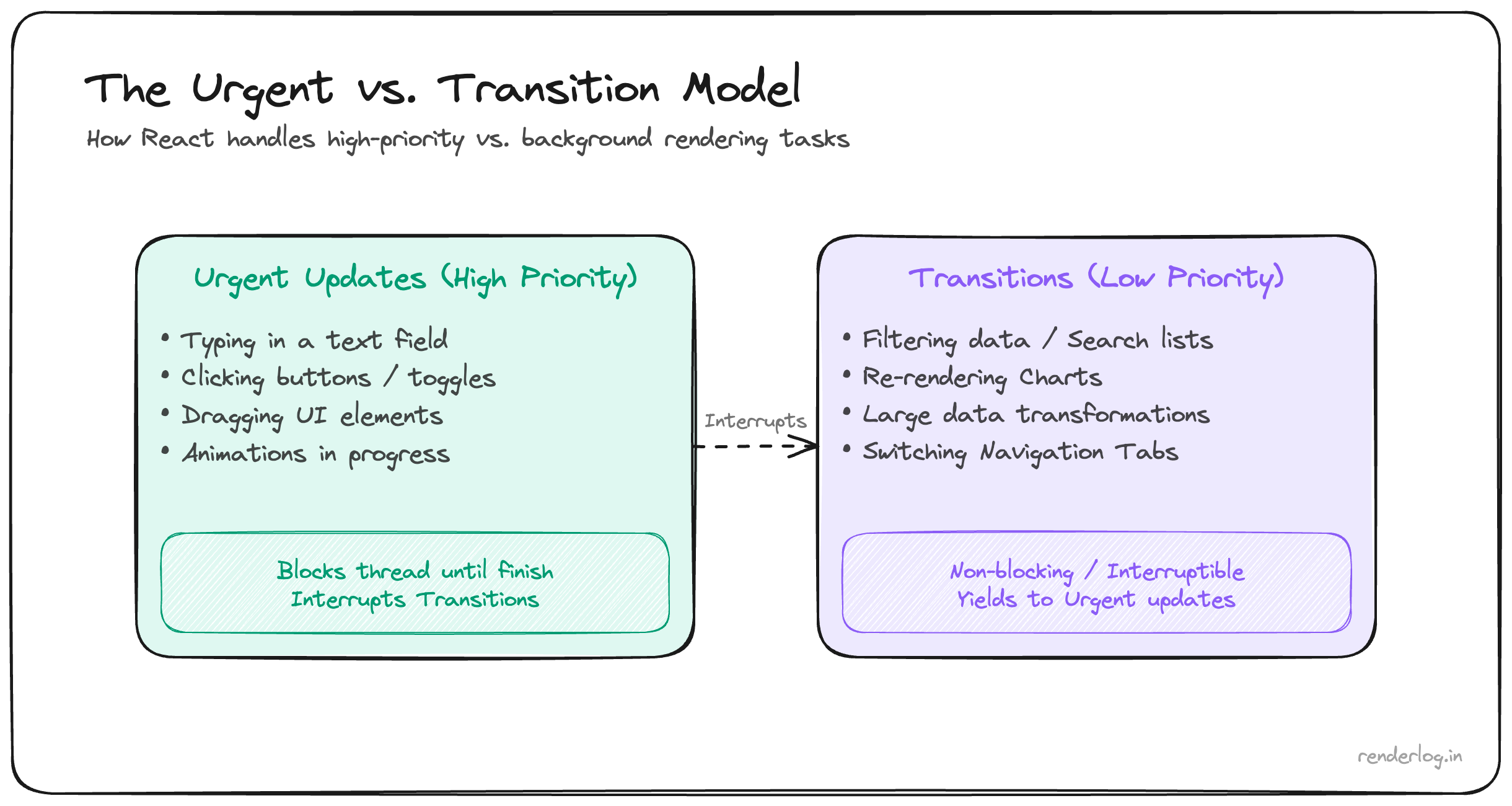
The mental model shift is: not all state updates are equally urgent. React now lets you declare which updates are urgent and which can wait.
The urgent vs deferred mental model
Think about a search box. Two things happen when you type:
- The input shows what you typed this needs to be instant. Any delay feels broken.
- The results list updates this can be slightly delayed (100ms of lag on the results is acceptable), 100ms of lag on the input is not.
Before concurrent React, both of these were treated the same. One onChange handler, one state update, one render. If filtering 5,000 items takes 200ms, both the input and the results freeze for 200ms.
Concurrent React lets you split these: the input state update is urgent, the filtered results state update is deferred. React renders the urgent update immediately, shows the user their character in the input, and then processes the expensive results filtering during idle time.
| Update type | Examples | React’s behavior |
|---|---|---|
| Urgent | Typing, clicking, pressing keys | Render immediately, never interrupt |
| Deferred (Transition) | Search results, tab content, route changes | Can be interrupted and restarted |
startTransition: wrapping deferred updates
startTransition is the API for marking a state update as non-urgent. React will still process it but it can be interrupted if an urgent update comes in, and it will be restarted from scratch when it continues.
import { startTransition, useState } from "react";

function SearchPage() {
  const [query, setQuery] = useState("");
  const [results, setResults] = useState(allItems);

  function handleChange(e) {
    const value = e.target.value;

    // Urgent: update the input immediately
    setQuery(value);

    // Deferred: the filtered results can wait
    startTransition(() => {
      setResults(allItems.filter(item =>
        item.name.toLowerCase().includes(value.toLowerCase())
      ));
    });
  }

  return (
    <>
      <input value={query} onChange={handleChange} />
      <ResultsList items={results} />
    </>
  );
}
Without startTransition, every keystroke triggers the filter synchronously blocking the input until the filter completes. With it, the input always updates immediately; the results update as soon as the main thread has time.
Important constraint: startTransition only works with React state updates. You can’t use it to defer setTimeout calls, native DOM updates, or third-party library updates. The update inside the startTransition callback must be a React setState or equivalent.
Also: transitions must eventually complete. React will not cancel a transition; it will finish it (just possibly after being interrupted and restarted). If your deferred computation is still expensive, concurrent features reduce the perception of lag, not the actual computation time. A 2-second filter is still 2 seconds of CPU work startTransition just means the input doesn’t freeze during those 2 seconds.
useTransition: getting the isPending flag
useTransition is the hook version of startTransition. It returns a [isPending, startTransition] tuple. The isPending boolean is true while the transition is in progress, letting you show loading states.
import { useTransition, useState } from "react";

function SearchPage() {
  const [query, setQuery] = useState("");
  const [results, setResults] = useState(allItems);
  const [isPending, startTransition] = useTransition();

  function handleChange(e) {
    const value = e.target.value;
    setQuery(value);
    startTransition(() => {
      setResults(allItems.filter(item =>
        item.name.toLowerCase().includes(value.toLowerCase())
      ));
    });
  }

  return (
    <>
      <input value={query} onChange={handleChange} />
      {isPending && <span className="loading-indicator">Updating...</span>}
      <ResultsList
        items={results}
        style={{ opacity: isPending ? 0.6 : 1 }}
      />
    </>
  );
}
The opacity trick is common: while the results are updating, dim them slightly so the user knows something is happening. It’s a much better UX than freezing the input.
useDeferredValue: a different tool for the same problem
useDeferredValue solves a similar problem but from a different angle. Instead of wrapping a state update in a transition, you defer the usage of a value.
import { useDeferredValue, useState } from "react";

function SearchPage() {
  const [query, setQuery] = useState("");
  const deferredQuery = useDeferredValue(query);

  return (
    <>
      {/* input uses the immediate query  no lag */}
      <input value={query} onChange={e => setQuery(e.target.value)} />

      {/* results use the deferred query: can lag behind */}
      <ResultsList query={deferredQuery} />
    </>
  );
}
useDeferredValue gives you the previous value of query during an urgent render, and schedules a background render with the new value. During that time, ResultsList is still showing results for the old query but it’s not blocking the input.
When to use each:
| API | When to reach for it |
|---|---|
startTransition / useTransition | You control the state update and want isPending |
useDeferredValue | You receive a prop or value you don’t control, or want a simpler API |
If you’re in the same component and control the state, useTransition is more explicit. If you’re in a child component receiving a prop, useDeferredValue is cleaner: you don’t need to thread the transition up to the parent.
Real use case: dashboard with expensive charts
We had a metrics dashboard where changing a date range filter caused every chart to re-render simultaneously. The filter UI itself would freeze for 300-400ms because the chart components were doing heavy data transformations inline.
Before:
function Dashboard() {
  const [dateRange, setDateRange] = useState(defaultRange);
  const chartData = computeAllChartData(rawData, dateRange); // expensive

  return (
    <>
      <DateRangePicker value={dateRange} onChange={setDateRange} />
      <RevenueChart data={chartData.revenue} />
      <ConversionChart data={chartData.conversions} />
      <RetentionChart data={chartData.retention} />
    </>
  );
}
Every setDateRange call blocked the DateRangePicker from reflecting the new value until all charts were done rendering.
After:
function Dashboard() {
  const [dateRange, setDateRange] = useState(defaultRange);
  const [isPending, startTransition] = useTransition();
  const [chartDateRange, setChartDateRange] = useState(defaultRange);

  function handleDateChange(range) {
    setDateRange(range); // urgent: picker updates immediately
    startTransition(() => {
      setChartDateRange(range); // deferred: charts can lag
    });
  }

  const chartData = computeAllChartData(rawData, chartDateRange);

  return (
    <>
      <DateRangePicker value={dateRange} onChange={handleDateChange} />
      <div style={{ opacity: isPending ? 0.7 : 1 }}>
        <RevenueChart data={chartData.revenue} />
        <ConversionChart data={chartData.conversions} />
        <RetentionChart data={chartData.retention} />
      </div>
    </>
  );
}
The picker is now instant. The charts dim and update as the main thread gets to them. The user knows something is happening and can keep adjusting the range without the UI freezing.
How concurrent features interact with Suspense
startTransition and Suspense work together intentionally. When a deferred update triggers a Suspense boundary, React won’t show the loading fallback immediately it holds the previous UI until the suspended content is ready (or until a timeout passes). This prevents jarring loading flickers.
function App() {
  const [tab, setTab] = useState("home");
  const [isPending, startTransition] = useTransition();

  return (
    <>
      <nav>
        <button onClick={() => startTransition(() => setTab("profile"))}>
          Profile
        </button>
      </nav>
      <Suspense fallback={<Spinner />}>
        {tab === "home" ? <HomeTab /> : <ProfileTab />}
      </Suspense>
    </>
  );
}
Without startTransition, switching tabs immediately shows the <Spinner /> fallback while ProfileTab loads. With it, React keeps showing HomeTab (slightly dimmed via isPending) until ProfileTab is ready, then switches: no flash of loading state.
React’s scheduler and priority lanes
Under the hood, React uses a scheduler that assigns priority levels to work. React 18 models this as priority lanes a bitmask system where different update types get different lanes.
The rough priority order:
- Discrete input (clicks, keypresses): highest priority
- Continuous input (mouse moves, scroll): high priority
- Default (data fetching callbacks, most
setStatecalls): normal priority - Transitions low priority, can be interrupted
- Offscreen (deferred rendering, pre-rendering) lowest priority
When React has work in multiple lanes, it processes the highest-priority lane first. This is how a keypress can interrupt an in-progress transition render the keypress gets a higher-priority lane, React pauses the transition work, handles the keypress, then resumes.
You don’t directly interact with lanes as a developer. But understanding that they exist explains why concurrent features aren’t just “delays” they’re a priority system.
What happens when you don’t use these: UI tearing
Tearing is a subtle concurrent-mode problem where different parts of the UI show inconsistent views of the same state. It can happen when React reads state during a render that gets interrupted, then resumes and reads again but the underlying data changed between those two reads.
React’s built-in state (useState, useReducer) is protected against tearing. But external stores (Zustand, Redux, or your own ref-based state) need to use the useSyncExternalStore hook to be safe in concurrent mode. Without it, it’s theoretically possible for one component to render with “old” external state while another renders with “new” external state in the same commit showing the user an internally inconsistent UI.
This is rare in practice but real. If you’re using concurrent features and external stores that predate React 18’s useSyncExternalStore, it’s worth checking whether those libraries have updated their React bindings.
Concurrent features don’t replace everything
It’s worth being explicit: startTransition and useDeferredValue are not silver bullets.
- They don’t reduce computation time a 2-second filter is still 2 seconds of work.
- They don’t replace virtualization if you have 50,000 DOM nodes, concurrent rendering won’t save you from the layout and paint cost.
- They don’t replace memoization if your component re-renders unnecessarily, concurrent features don’t fix that.
- They don’t help with I/O network requests, file reads, and other async work aren’t in scope.
What they do: reduce the user-perceived impact of expensive synchronous CPU work by keeping high-priority interactions responsive while that work happens in the background.
Use them for exactly that. Profile first (React DevTools Profiler, Chrome Performance panel), confirm you have an expensive synchronous render causing input jank, then reach for startTransition.