
localStorage caps at 5MB. IndexedDB writes a 50MB buffer in ~850ms — slow enough to feel it. The Cache API is effectively read-only. The File System Access API requires user permission prompts every session. None of these were designed for what serious client-side applications actually need: large, fast, random-access binary storage that persists across sessions without permission prompts.
The Origin Private File System (OPFS) fills that gap. It is a real, sandboxed filesystem per origin, invisible to the OS file manager, persistent across sessions, and accessible with a synchronous API from within Workers that makes large sequential I/O genuinely fast.
What this covers: The OPFS API in detail, the synchronous access handle (and why it only works in Workers), streaming network responses directly to OPFS, the performance difference vs IndexedDB, and how SQLite runs in the browser using OPFS as its backing store.
The storage landscape problem
Before OPFS existed, the browser gave you four options for persistent storage, and each one was the wrong tool for at least one important job:
localStorage is synchronous (which feels nice), but the 5–10MB limit is a hard wall. It is also string-only, so storing binary data means base64 encoding which inflates size by ~33% and makes a 5MB limit feel like 3.7MB.
IndexedDB can handle gigabytes in theory, is asynchronous, and supports structured objects and binary blobs. But the API is callback-hell wrapped in a transaction model that wasn’t designed for ergonomics. More practically: writing large sequential blobs to IndexedDB is slow. The implementation serializes data through the structured clone algorithm on every write, and for large files you feel that cost. I measured ~400ms to write a 50MB buffer in Chrome on M2 fine once, unbearable repeatedly.
Cache API (Service Worker caches) is designed for HTTP responses and works well for caching network resources. But it is fundamentally read-after-write: you cannot partially update a cached entry or seek to an offset. Building a writable file system on top of it is like building a database on top of a log file possible in theory, miserable in practice.
File System Access API lets you open actual OS files with a picker. That’s useful for “open a video from your desktop” flows, but it’s not sandboxed the user sees the file in their Downloads folder, file paths can leak, and the permission model requires a user gesture every session. It’s the wrong tool for internal app storage.
OPFS is the missing piece: a sandboxed filesystem per origin, invisible to the OS file manager, persistent across sessions, and critically accessible with a synchronous API from within Workers.
What OPFS actually is
The Origin Private File System is a real filesystem exposed to web pages through the StorageManager API. Every origin gets its own isolated root directory. Files you create there are not visible in the OS Finder/Explorer. Other origins cannot access them. Clearing site data removes them.
You access the root with:
const root = await navigator.storage.getDirectory();
That returns a FileSystemDirectoryHandle. From there you navigate a real directory tree:
// Create or open a subdirectory
const cacheDir = await root.getDirectoryHandle('datasets', { create: true });

// Create or open a file
const fileHandle = await cacheDir.getFileHandle('analytics-v3.bin', { create: true });
To write to that file, you create a writable stream:
const writable = await fileHandle.createWritable();
await writable.write(myArrayBuffer);
await writable.close();
To read it back:
const file = await fileHandle.getFile(); // returns a File object
const buffer = await file.arrayBuffer();
// or: const stream = file.stream();
// or: const text = await file.text();
The File object you get from getFile() is the same File type you’d get from an <input type="file">. You can pass it directly to new Response(file), pipe its .stream() into a TransformStream, or just read it as an ArrayBuffer. This composability is one of the things I genuinely like about the API.
The synchronous access handle why it matters
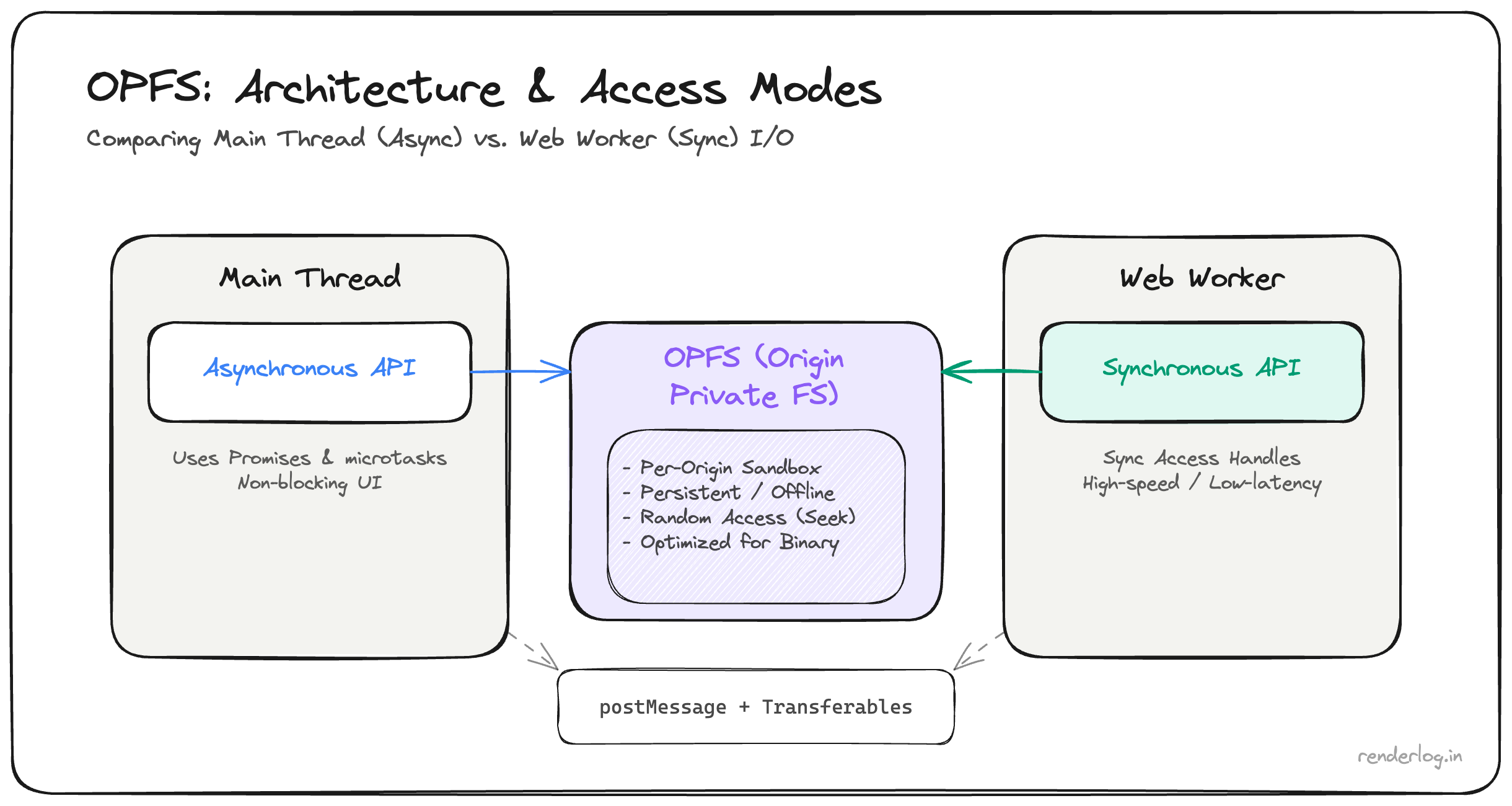
Here is the part that makes OPFS genuinely different from everything else: inside a Web Worker, you can open a file in synchronous mode.
// Inside a Worker
const root = await navigator.storage.getDirectory();
const fileHandle = await root.getFileHandle('dataset.bin', { create: true });

// This is a synchronous handle  only available in Workers
const syncHandle = await fileHandle.createSyncAccessHandle();

// Synchronous read
const buffer = new ArrayBuffer(1024 * 1024);
const bytesRead = syncHandle.read(buffer, { at: 0 });

// Synchronous write
const data = new Uint8Array([1, 2, 3, 4]);
syncHandle.write(data, { at: 0 });

// You must flush and close explicitly
syncHandle.flush();
syncHandle.close();
The createSyncAccessHandle() method is only available in dedicated Workers it deliberately cannot be called on the main thread, because synchronous I/O on the main thread would block rendering. But in a Worker, synchronous access is exactly what you want: no Promise overhead, no microtask queue, just a tight read/write loop that runs at native speed.
The performance difference is meaningful. In my testing, writing a 100MB ArrayBuffer with createSyncAccessHandle took ~90ms. The equivalent IndexedDB write took ~850ms. The gap comes from two places: OPFS bypasses the structured clone algorithm for raw binary data, and the synchronous handle avoids the async event loop overhead that accumulates across thousands of small writes.
Worker + OPFS patterns
The right architecture is: all OPFS work in a Worker, communicate with the main thread via messages.
Here’s the pattern I ended up with:
// opfs-worker.js
self.onmessage = async (event) => {
  const { type, payload } = event.data;

  if (type === 'WRITE_FILE') {
    const { path, buffer } = payload;
    const root = await navigator.storage.getDirectory();
    const handle = await root.getFileHandle(path, { create: true });
    const syncHandle = await handle.createSyncAccessHandle();

    syncHandle.truncate(0);
    syncHandle.write(new Uint8Array(buffer), { at: 0 });
    syncHandle.flush();
    syncHandle.close();

    self.postMessage({ type: 'WRITE_DONE', path });
  }

  if (type === 'READ_FILE') {
    const { path } = payload;
    const root = await navigator.storage.getDirectory();
    const handle = await root.getFileHandle(path);
    const file = await handle.getFile();
    const buffer = await file.arrayBuffer();

    // Transfer the buffer (zero-copy)
    self.postMessage({ type: 'READ_DONE', path, buffer }, [buffer]);
  }
};
// main thread
const worker = new Worker('/opfs-worker.js');

worker.postMessage({
  type: 'WRITE_FILE',
  payload: { path: 'analytics-v3.bin', buffer: myArrayBuffer }
}, [myArrayBuffer]); // transfer ownership  zero copy

worker.onmessage = (event) => {
  if (event.data.type === 'READ_DONE') {
    processData(event.data.buffer);
  }
};
The key here is Transferable objects. When you pass [myArrayBuffer] as the second argument to postMessage, ownership transfers to the Worker no copy is made. For a 150MB buffer, this matters. Without transfer, the browser would serialize and copy the data twice (once into the Worker’s memory, once back). With transfer, it’s a pointer swap essentially free.
Streaming writes from the network
One of the most useful patterns is streaming a network response directly to OPFS, without ever materializing the full response in memory:
// Stream a large file from the network directly to OPFS
async function streamToOPFS(url, filename) {
  const root = await navigator.storage.getDirectory();
  const fileHandle = await root.getFileHandle(filename, { create: true });
  const writable = await fileHandle.createWritable();

  const response = await fetch(url);

  if (!response.body) throw new Error('ReadableStream not supported');

  // Pipe the response body directly to OPFS
  await response.body.pipeTo(writable);
  // writable is automatically closed when pipeTo() resolves
}
createWritable() returns a FileSystemWritableFileStream, which implements the WHATWG WritableStream interface. That means you can pipeTo() any ReadableStream directly into it including response.body. The data flows through without a single full-buffer copy in JavaScript land. For large WASM binaries or video files, this is the right way to download and cache them.
Real use case: caching a 200MB WASM binary
This was essentially what we were doing. We had a data-processing WASM module that was 200MB and updated infrequently. On first load, we streamed it from the CDN into OPFS. On subsequent loads, we checked if the cached version was current (compared an ETag stored in localStorage), and if so, read it straight from OPFS:
async function getWasmModule(url, etag) {
  const root = await navigator.storage.getDirectory();
  const cacheDir = await root.getDirectoryHandle('wasm-cache', { create: true });

  try {
    const storedEtag = localStorage.getItem('wasm-etag');
    if (storedEtag === etag) {
      const handle = await cacheDir.getFileHandle('module.wasm');
      const file = await handle.getFile();
      return WebAssembly.compileStreaming(new Response(file.stream(), {
        headers: { 'Content-Type': 'application/wasm' }
      }));
    }
  } catch {
    // File doesn't exist yet, fall through to fetch
  }

  // Fetch and cache
  const response = await fetch(url);
  const [stream1, stream2] = response.body.tee();

  const handle = await cacheDir.getFileHandle('module.wasm', { create: true });
  const writable = await handle.createWritable();

  // Write to OPFS and compile simultaneously
  const [wasmModule] = await Promise.all([
    WebAssembly.compileStreaming(new Response(stream1, {
      headers: { 'Content-Type': 'application/wasm' }
    })),
    new Response(stream2).arrayBuffer().then(buf => writable.write(buf)).then(() => writable.close())
  ]);

  localStorage.setItem('wasm-etag', etag);
  return wasmModule;
}
The ReadableStream.tee() lets us split one response body into two one piped into WASM compilation, one saved to OPFS. The module compiles and caches in a single network round trip.
OPFS + SQLite: the surprising use case
One of the most interesting production uses of OPFS is as a backing store for SQLite in the browser. The sqlite-wasm project (the official SQLite WASM build) uses the synchronous OPFS access handle to implement POSIX-style file I/O:
import { default as sqlite3InitModule } from '@sqlite.org/sqlite-wasm';

const sqlite3 = await sqlite3InitModule({ print: console.log });

// Use OPFS-backed database (runs in a Worker)
const db = new sqlite3.oo1.OpfsDb('/myapp.sqlite3');
db.exec('CREATE TABLE IF NOT EXISTS events (id INTEGER PRIMARY KEY, data TEXT)');
db.exec("INSERT INTO events(data) VALUES('hello')");
const rows = db.exec({ sql: 'SELECT * FROM events', returnValue: 'resultRows' });
This is a full SQLite database, persisted to OPFS, with ACID transactions, SQL queries, and all the features you’d expect running entirely in the browser. The sync handle’s random-access read/write is what makes this possible: SQLite needs to be able to seek to arbitrary byte offsets and do partial writes, which is exactly what syncHandle.read(buffer, { at: offset }) provides.
Storage comparison table
| localStorage | IndexedDB | Cache API | OPFS | |
|---|---|---|---|---|
| Size limit | ~5MB | Hundreds of MB / GB | Hundreds of MB / GB | Hundreds of MB / GB |
| API style | Synchronous | Async (promises) | Async (promises) | Async main / Sync in Worker |
| Binary support | No (base64 only) | Yes (Blob/ArrayBuffer) | Yes (Response body) | Yes (native) |
| Random access | No | No (seek via cursors) | No | Yes ({ at: offset }) |
| Write speed (100MB) | N/A | ~850ms | N/A | ~90ms (sync handle) |
| Streaming writes | No | No | Via fetch | Yes (WritableStream) |
| Worker access | Yes | Yes | Yes | Yes (sync handle in Worker) |
| Best for | Small key-value config | Structured app data | HTTP response caching | Large blobs, binary files, SQLite |
Quota management
OPFS storage counts toward the origin’s storage quota, shared with IndexedDB and the Cache API. The browser manages this as a pool. You can query it:
const estimate = await navigator.storage.estimate();
console.log(`Used: ${estimate.usage} bytes`);
console.log(`Available: ${estimate.quota - estimate.usage} bytes`);

// Breakdown by storage type
console.log(estimate.usageDetails);
// { indexedDB: 1234567, caches: 0, fileSystem: 208000000 }
On Chrome, the quota is typically around 60% of available disk space. On mobile, it can be much smaller, and the browser can evict storage under pressure unless you’ve called navigator.storage.persist() and the user granted permission.
// Request persistent storage (shows a permission prompt or is auto-granted based on engagement)
const isPersisted = await navigator.storage.persist();
if (!isPersisted) {
  console.warn('Storage may be evicted under disk pressure');
}
For a production app, always check estimate() before writing large blobs and handle the case where quota is insufficient gracefully.
Browser support
| Browser | OPFS Available | Sync Access Handle | Notes |
|---|---|---|---|
| Chrome 102+ | Yes | Yes (Chrome 108+) | Full support |
| Firefox 111+ | Yes | Yes | Full support |
| Safari 15.2+ | Yes | Yes (Safari 16+) | Full support |
| Edge 102+ | Yes | Yes | Chromium-based |
| iOS Safari 15.2+ | Partial | Yes (16+) | Storage limits tighter |
| Chrome Android | Yes | Yes | Same as desktop |
The main gap to watch is iOS Safari storage limits Apple’s browsers on iOS are more aggressive about quota eviction and the persist() permission is harder to get. If you’re targeting iOS for large offline datasets, test on actual iOS hardware and check estimate() before assuming you have the space.
Wrapping up
OPFS is not glamorous. It doesn’t show up in “top 10 web APIs” listicles. But if you’ve ever hit the limits of IndexedDB for large binary data, or tried to build an offline-capable app with complex storage needs, it’s the API that should have been there all along.
The mental model is simple: it’s a real filesystem, sandboxed per origin, with a synchronous API available in Workers that makes large sequential I/O genuinely fast. Pair it with Transferable objects for zero-copy messaging, stream network responses directly into it, and use sqlite-wasm if you need a full relational layer.
The storage landscape went: localStorage → IndexedDB → Cache API → File System Access API → OPFS. Each one fills a different gap. OPFS fills the one that matters most for serious client-side data: fast, large, random-access binary storage that you actually control.