
SPAs bypass the browser’s built-in HTTP caching by routing in JavaScript: the page never reloads, so the browser never re-evaluates cache headers on the HTML. Every component instance fetches its own data. Two components on the same page requesting /api/user fire two separate network requests. Navigating back to a route you visited 30 seconds ago triggers a full refetch.
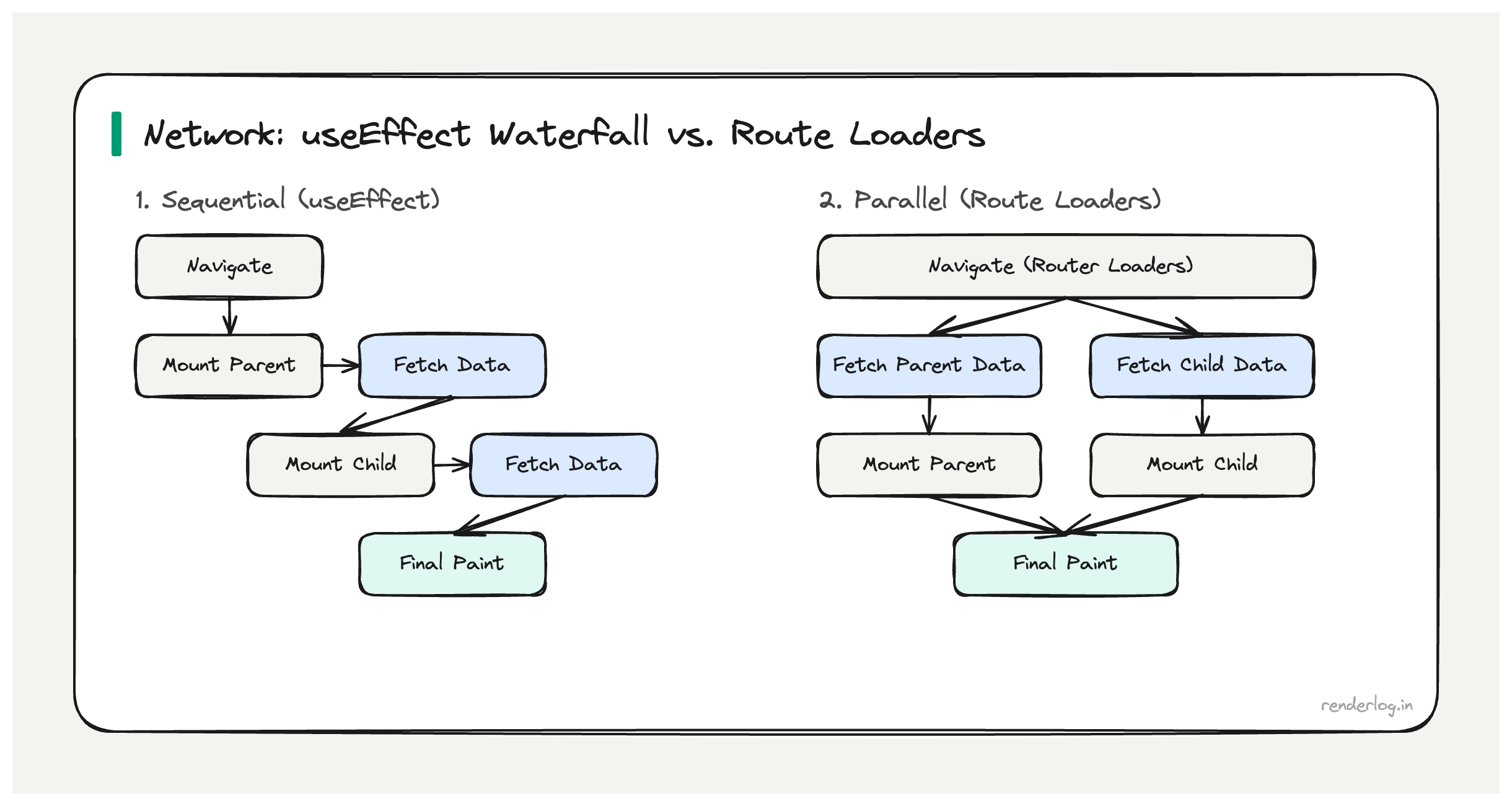
Why this matters: Each useEffect-based fetch introduces a render-then-fetch waterfall. Stacked across multiple nested route components, this compounds to seconds of latency on navigations that could be instant with correct caching.
What this covers: HTTP cache headers and stale-while-revalidate, how React Query implements client-side SWR, request deduplication, avoiding request waterfalls with route loaders, prefetch-on-hover, and Service Worker caching strategies.
The SPA network problem
Server-rendered apps get HTTP caching for free the browser caches the HTML response, and subsequent navigations can be served from the browser cache. SPAs bypass this by routing in JavaScript: the page never reloads, so the browser never re-evaluates cache headers on the HTML. The app controls its own data fetching, and by default, React components have no shared cache every component instance fetches its own data.
The consequences compound:
- Waterfall fetches on navigation a route component mounts, kicks off a
useEffect, waits for the response, then maybe kicks off more fetches based on the result - No deduplication two components on the same page both requesting
/api/userwill fire two separate network requests - Cache amnesia navigating back to a page you visited 10 seconds ago triggers a full refetch
- Loading states everywhere because you’re always waiting for network, even for data you theoretically already have
Fixing this properly requires thinking at multiple levels: HTTP caching, in-memory client-side caching, and request coordination.
HTTP cache headers: the foundation you’re probably skipping
Before reaching for a library, it’s worth understanding what HTTP caching can do for you. Most React apps I’ve seen send API responses with Cache-Control: no-cache or no cache headers at all effectively opting out of one of the most powerful performance mechanisms in the web platform.
The Cache-Control header controls how long a response can be cached:
# Cache for 60 seconds, no revalidation needed
Cache-Control: max-age=60

# Cache but always revalidate with If-None-Match before using
Cache-Control: no-cache
ETag: "abc123"

# Serve cached version immediately, revalidate in background
Cache-Control: max-age=60, stale-while-revalidate=300
max-age tells the browser it can use the cached response for N seconds without hitting the network at all. For data that changes infrequently (user settings, feature flags, navigation structure), setting max-age=300 (5 minutes) eliminates unnecessary network round trips on every navigation.
ETag lets the server say “this is version X of this resource.” On subsequent requests, the browser sends If-None-Match: "abc123". If the resource hasn’t changed, the server responds with 304 Not Modified and no body the browser uses its cached copy. You save bandwidth but still pay the round-trip latency. Useful for data that changes unpredictably.
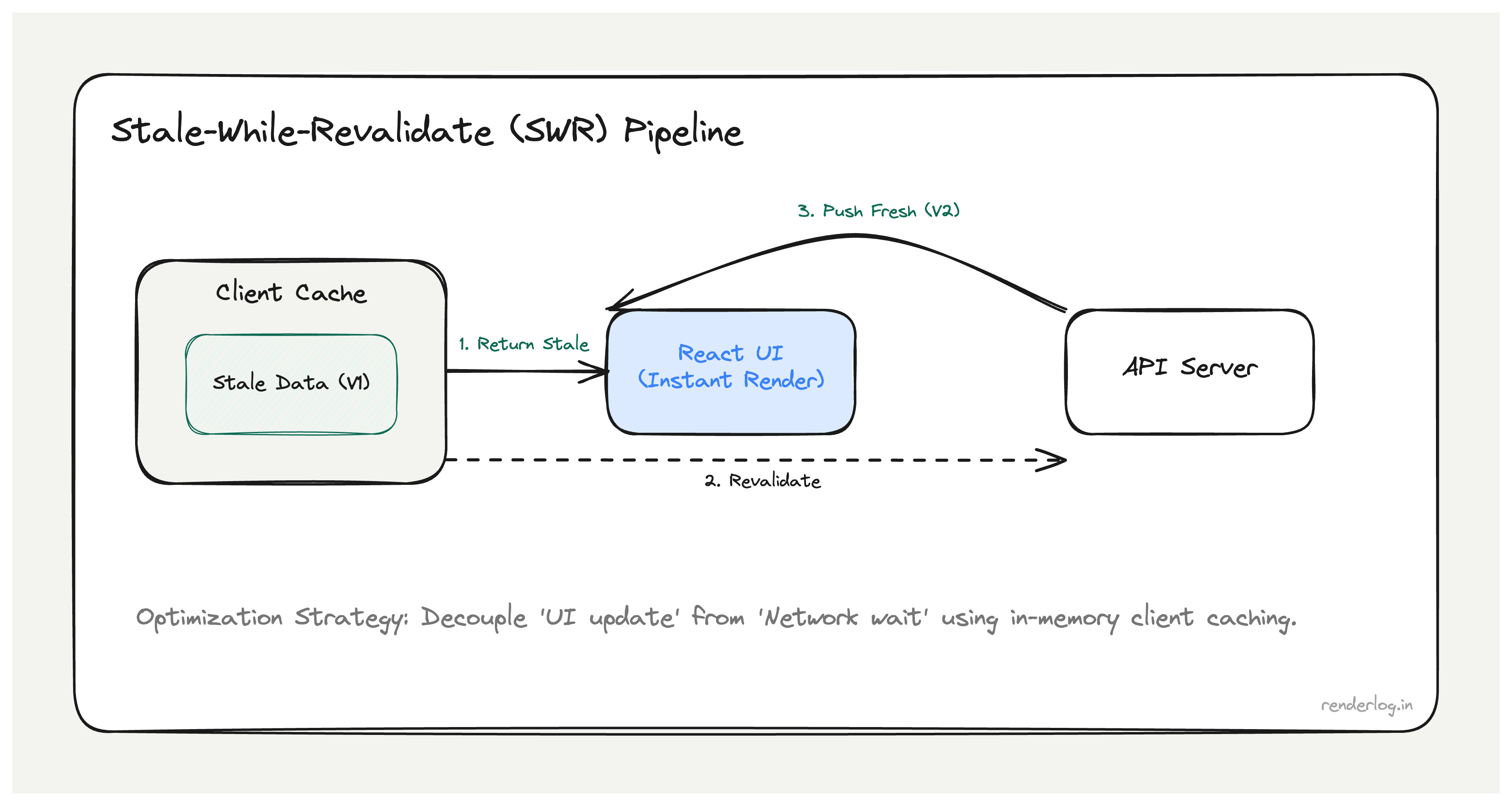
stale-while-revalidate is the most useful directive for SPA data. It means: serve the cached version immediately (no network wait), but in the background revalidate with the server. If the server has fresh data, update the cache for the next request. The user never sees a loading state they see the old data instantly, and if anything changed, it updates on the next navigation.
The actual HTTP stale-while-revalidate directive requires server-side support. But even if your API doesn’t support it, you can implement the same pattern in client-side JavaScript which is exactly what React Query and SWR do.
Stale-while-revalidate in JavaScript: React Query internals
React Query (now TanStack Query) implements the stale-while-revalidate pattern in the browser’s memory. Here’s the mental model:
- On the first request for a query key, fetch from the network and cache the result
- On subsequent requests for the same key, return the cached result immediately
- If
staleTimehas elapsed, fire a background revalidation request - When revalidation completes, update the cache and re-render components that are subscribed to this key
// Basic React Query setup
const { data, isLoading, isFetching } = useQuery({
  queryKey: ['user', 'profile'],
  queryFn: () => fetch('/api/user/profile').then(r => r.json()),
  staleTime: 60 * 1000,      // Data is "fresh" for 60 seconds
  gcTime: 5 * 60 * 1000,     // Keep in memory for 5 minutes after last use
});

// isLoading: true only on the very first fetch (no cached data)
// isFetching: true whenever a network request is in flight (including background)
The key distinction is isLoading vs isFetching. isLoading is true only when there’s no cached data at all the initial state. isFetching is true during any network activity, including background revalidations. If you show your loading spinner on isFetching instead of isLoading, you’ll show a spinner during every background revalidation, which is the bug we started with.
// WRONG: shows spinner during background refetches
if (isFetching) return <Spinner />;

// RIGHT: only shows spinner when there's genuinely no data to show
if (isLoading) return <Spinner />;
return <Profile data={data} />;
Request deduplication
Request deduplication means that if two components both request the same query key simultaneously, only one network request fires. React Query handles this automatically:
// Both of these components can exist on the same page simultaneously.
// React Query fires exactly ONE network request for ['user', 'profile'].

function Header() {
  const { data } = useQuery({ queryKey: ['user', 'profile'], queryFn: fetchProfile });
  return <Avatar src={data?.avatar} />;
}

function Sidebar() {
  const { data } = useQuery({ queryKey: ['user', 'profile'], queryFn: fetchProfile });
  return <UserName>{data?.name}</UserName>;
}
Under the hood, React Query maintains a query cache keyed by the serialized query key. When the second component calls useQuery with the same key while the first request is still in-flight, it subscribes to the same pending Promise. Both components re-render when the single request resolves.
Without this, a page with 3 components all fetching the user profile would fire 3 API calls on every mount. With React Query, it’s always 1. At scale across hundreds of components, dozens of users, millions of navigations this is a meaningful reduction in API server load, not just network performance.
Avoiding request waterfalls in React
The most expensive network pattern in React SPAs is the request waterfall: a component mounts, fetches data, receives the response, then fetches more data based on what it received.
// WATERFALL: this pattern creates a network chain
function UserDashboard() {
  const [user, setUser] = useState(null);
  const [posts, setPosts] = useState(null);

  useEffect(() => {
    fetchUser().then(u => {
      setUser(u);
      // Can't fetch posts until we have the userId  creates a waterfall
      fetchPostsByUser(u.id).then(setPosts);
    });
  }, []);
}
If fetchUser takes 200ms and fetchPostsByUser takes 150ms, total load time is 350ms. If you parallelize them (when you know the userId ahead of time), it’s 200ms. The waterfall cost compounds with every additional sequential fetch.
React Router loaders solve this by moving data fetching outside the component tree:
// React Router v6.4+ loaders
export async function dashboardLoader({ params }) {
  // These run in parallel  no waterfall
  const [user, posts] = await Promise.all([
    fetchUser(params.userId),
    fetchPostsByUser(params.userId)
  ]);
  return { user, posts };
}

function UserDashboard() {
  const { user, posts } = useLoaderData();
  // Data is already here when the component mounts
  return <Dashboard user={user} posts={posts} />;
}
Loaders run as soon as the route transition begins before the component mounts, and in parallel with each other if multiple routes load simultaneously. The component never needs a loading state for the initial data.
Prefetching strategies
Prefetching is fetching data before the user navigates to it so when they do navigate, the data is already in cache.
React Query exposes queryClient.prefetchQuery() for this:
const queryClient = useQueryClient();

// Prefetch on hover  user is probably about to click
function NavLink({ to, queryKey, queryFn, children }) {
  const prefetch = () => {
    queryClient.prefetchQuery({ queryKey, queryFn, staleTime: 10000 });
  };

  return (
    <Link to={to} onMouseEnter={prefetch} onFocus={prefetch}>
      {children}
    </Link>
  );
}
The trick with hover prefetching is that the human reaction time from hover to click is typically 100–200ms. A fast API response takes 50–150ms. If you kick off the prefetch on hover, the data is often already in cache by the time the navigation happens.
For less predictable navigation, prefetch on requestIdleCallback:
// Prefetch the most likely next routes when the browser is idle
function prefetchLikelyRoutes(queryClient) {
  requestIdleCallback(() => {
    LIKELY_NEXT_ROUTES.forEach(({ queryKey, queryFn }) => {
      queryClient.prefetchQuery({ queryKey, queryFn, staleTime: 30000 });
    });
  }, { timeout: 2000 });
}
Resource hints: preconnect, prefetch, preload
HTML resource hints give the browser signals about what to load before the page needs it:
<!-- Preconnect: establish TCP/TLS with the API domain early -->
<link rel="preconnect" href="https://api.myapp.com" />

<!-- Prefetch: download a resource in the background for future navigations -->
<link rel="prefetch" href="/dashboard" />

<!-- Preload: download a resource needed for THIS page, high priority -->
<link rel="preload" href="/fonts/inter.woff2" as="font" crossorigin />
| Hint | Priority | When to use |
|---|---|---|
preconnect | High | Known API domains you’ll fetch from on page load |
dns-prefetch | Low | Domains you might fetch from (lower cost than preconnect) |
preload | High | Resources needed for current page (LCP image, critical font, main JS) |
prefetch | Idle | Resources needed for likely next page (low-priority, uses idle time) |
modulepreload | Medium | JavaScript modules needed for next route |
preconnect is the easiest win. Your API domain requires DNS lookup + TCP handshake + TLS handshake before the first byte that’s typically 100–300ms. With <link rel="preconnect">, that work happens while the HTML is being parsed, not when your JavaScript first calls fetch().
Priority Hints
fetchpriority tells the browser how to prioritize resource downloads:
<!-- LCP image: fetch immediately, high priority -->
<img src="/hero.jpg" fetchpriority="high" loading="eager" />

<!-- Below-fold image: deprioritize -->
<img src="/footer-decoration.jpg" fetchpriority="low" loading="lazy" />
// High-priority fetch for critical data
const criticalData = await fetch('/api/critical-config', {
  priority: 'high'
});

// Low-priority fetch for analytics or non-blocking data
fetch('/api/track-view', { priority: 'low' });
The browser has a limited number of simultaneous connections per domain (typically 6 for HTTP/1.1, effectively unlimited for HTTP/2). Without priority hints, it fetches in order of discovery which might mean your LCP image is queued behind a dozen low-priority requests. fetchpriority="high" ensures the browser front-runs it.
Service Workers for network interception
A Service Worker sits between your app and the network and can implement sophisticated caching strategies:
// service-worker.js
const CACHE_NAME = 'api-cache-v1';
const CACHEABLE_APIS = ['/api/user/profile', '/api/feature-flags'];

self.addEventListener('fetch', (event) => {
  const url = new URL(event.request.url);

  if (CACHEABLE_APIS.some(path => url.pathname.startsWith(path))) {
    event.respondWith(staleWhileRevalidate(event.request));
  }
});

async function staleWhileRevalidate(request) {
  const cache = await caches.open(CACHE_NAME);
  const cached = await cache.match(request);

  // Always kick off a revalidation in the background
  const networkFetch = fetch(request).then(response => {
    if (response.ok) {
      cache.put(request, response.clone());
    }
    return response;
  });

  // Return cached immediately if available, else wait for network
  return cached || networkFetch;
}
The Service Worker pattern is more powerful than React Query alone for one reason: it works across page loads. React Query’s cache lives in memory it’s cleared when the user closes the tab. A Service Worker cache persists across navigations and can serve data offline.
Connection-aware fetching
The Network Information API gives you the user’s connection type, which lets you adapt what you fetch:
const connection = navigator.connection;

function getImageQuality() {
  if (!connection) return 'high'; // API not supported, assume fast

  if (connection.saveData) return 'low'; // User explicitly wants to save data
  if (connection.effectiveType === '2g') return 'low';
  if (connection.effectiveType === '3g') return 'medium';
  return 'high';
}

// Adaptive image loading
const quality = getImageQuality();
const imageUrl = `/api/image/${id}?quality=${quality}`;
The API is available in Chrome and Android browsers but not Safari. Always check for its existence before using it, and never use it as the only signal fall back to a sensible default.
What the network tab tells you
When diagnosing SPA network performance, I filter the Chrome DevTools Network tab to XHR/Fetch and look for:
- Duplicate requests same URL called multiple times in rapid succession (deduplication needed)
- Sequential requests requests starting only after previous ones complete (waterfall pattern)
- Cache misses on repeat visits
Status: 200on requests you’d expect to be304 Not Modified(cache headers misconfigured) - Unthrottled polling the same request firing every few seconds even when nothing changed
- Stacking spinners multiple loading states visible at once (data needs to be fetched in parallel, not sequentially)
The rule of thumb I use: if you see the same URL more than once in a 10-second window without explicit user action, you have a caching problem.
Putting it together
The layered approach to SPA network performance:
| Layer | Mechanism | Wins |
|---|---|---|
| HTTP | Cache-Control, ETag, stale-while-revalidate | Eliminates round trips for stable data |
| Resource hints | preconnect, preload | Reduces connection and load latency |
| Client cache | React Query / SWR | Deduplication, stale-while-revalidate, garbage collection |
| Routing | Route loaders, parallel fetches | Eliminates sequential waterfall fetches |
| Prefetching | On hover, on idle | Populates cache before navigation |
| Service Worker | Cache-first / network-first strategies | Persistence across page loads, offline support |
Each layer is independent you can add them incrementally. Start with React Query and staleTime: 60000 on your most-fetched queries, add <link rel="preconnect"> for your API domain, and measure. The 800ms spinner on every navigation usually disappears after just the first two steps.