
DOM nodes are never free. A table with 3,000 rows rendered all at once means 3,000 nodes consuming memory, participating in style recalculation, and holding layout state — even the rows the user cannot see. On a mid-range Android, style recalculation across 10,000 nodes can take 180ms per frame, making simple interactions feel broken.
What this covers: Why pagination, infinite scroll, and virtualization solve different problems (and which is right for which use case), how windowing libraries keep DOM count constant at ~35 nodes regardless of dataset size, and when NOT to virtualize.
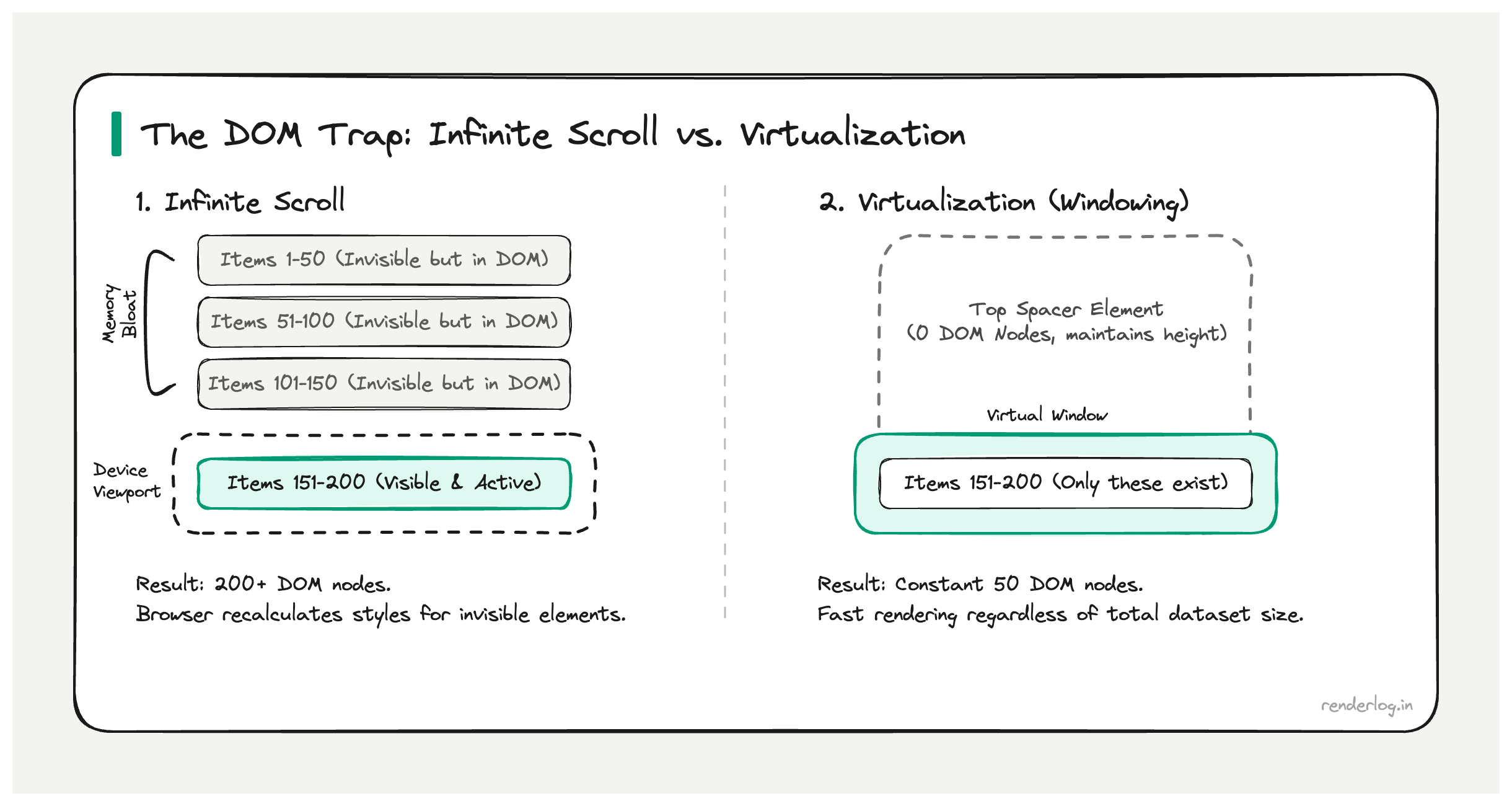
Why DOM nodes are expensive even when not visible
When you render 10,000 list items, even if they’re all below the fold, the browser still:
- Allocates memory for each DOM node and its computed styles
- Runs style recalculation across the full node tree when any ancestor’s style changes
- Maintains hit-testing geometry for all nodes (the browser needs to know which element is under the cursor)
- Invalidates layout across the entire document when anything affecting flow changes
The cost isn’t linear. It compounds. The browser’s style system has to cascade rules down a larger tree. Layout changes propagate further. Garbage collection has more live objects to track. On a mid-range Android device, this can make simple interactions like clicking a checkbox feel noticeably sluggish not because the interaction itself is expensive, but because the browser is doing background work to maintain 10,000 invisible nodes.
The target: render only what the user can actually see, plus a small buffer.
Pagination: the underrated classic
Pagination is the oldest solution and still the right answer in a surprising number of cases. You split your dataset into pages and only render one page at a time. The URL typically encodes the page number.
function ProductTable({ totalItems }) {
  const [page, setPage] = useState(1);
  const { data, isLoading } = useQuery({
    queryKey: ["products", page],
    queryFn: () => fetchProducts({ page, limit: 50 }),
  });

  return (
    <>
      <table>
        <tbody>
          {data?.items.map(item => <ProductRow key={item.id} item={item} />)}
        </tbody>
      </table>
      <Pagination
        currentPage={page}
        totalPages={Math.ceil(totalItems / 50)}
        onPageChange={setPage}
      />
    </>
  );
}
The advantages of pagination are often undersold:
- URL-addressable state users can bookmark page 7, share it, use the back button
- Predictable render cost 50 rows is 50 rows, always
- Simple implementation no intersection observers, no scroll event math, no size measurements
- Screen reader friendly each page is a complete, navigable list
The disadvantage people always cite is “it breaks the flow.” That’s true for some use cases (social feeds, search results where you’re browsing) and false for others (admin tables, data exports, paginated reports). If users are looking for a specific record, pagination with a known page number is actually better UX than infinite scroll because it gives them a reference point.
| Pagination pros | Pagination cons |
|---|---|
| URL-shareable, bookmark-friendly | Context loss when navigating away and back |
| Simple, accessible, SSR-friendly | Not ideal for exploratory browsing |
| Predictable per-page render cost | Friction for “load more” UX patterns |
| Works well with search and sort | Doesn’t feel native on mobile social-feed patterns |
When to choose pagination: data tables, search results with known structure, anything where users need to reference a specific position, admin interfaces, SSR-first applications.
Infinite scroll: the UX appeal vs the implementation reality
Infinite scroll removes explicit page controls. As the user scrolls toward the bottom, new content loads automatically. Social feeds, e-commerce product grids, and content discovery surfaces all use it because it encourages continued engagement.
The standard implementation uses IntersectionObserver to detect when a sentinel element (placed at the bottom of the list) enters the viewport.
function InfiniteList() {
  const { data, fetchNextPage, hasNextPage, isFetchingNextPage } =
    useInfiniteQuery({
      queryKey: ["items"],
      queryFn: ({ pageParam = 1 }) => fetchItems({ page: pageParam }),
      getNextPageParam: (lastPage) => lastPage.nextPage ?? undefined,
    });

  const sentinelRef = useRef(null);

  useEffect(() => {
    const observer = new IntersectionObserver(
      ([entry]) => {
        if (entry.isIntersecting && hasNextPage && !isFetchingNextPage) {
          fetchNextPage();
        }
      },
      { threshold: 0.1 }
    );

    if (sentinelRef.current) observer.observe(sentinelRef.current);
    return () => observer.disconnect();
  }, [hasNextPage, isFetchingNextPage, fetchNextPage]);

  const allItems = data?.pages.flatMap(page => page.items) ?? [];

  return (
    <div>
      {allItems.map(item => <ListItem key={item.id} item={item} />)}
      <div ref={sentinelRef} style={{ height: 1 }} />
      {isFetchingNextPage && <Spinner />}
    </div>
  );
}
The problem: infinite scroll doesn’t delete old items. After loading 10 pages of 50 items each, you have 500 DOM nodes. Load 50 pages and you’re back to the original problem. Infinite scroll solves the initial render but doesn’t prevent DOM accumulation over time.
The back-button problem is the other painful one. If a user scrolls to item 300, clicks into a detail view, and hits back they’re transported to the top of the list. Their scroll position is gone. Frameworks and libraries have various partial solutions (scroll restoration, session storage, query cache) but none are perfect. This is a known unsolved UX problem with infinite scroll.
Virtualization: the right tool for large static or near-static lists
Virtualization (also called windowing) renders only the items currently visible in the viewport, plus a small buffer above and below. As the user scrolls, items entering the viewport are rendered; items leaving are unmounted or recycled.
The math: if your viewport shows 15 items at a time and you have a buffer of 10 above and below, you’re maintaining at most 35 DOM nodes regardless of whether your list has 1,000 items or 1,000,000.
Total dataset: 10,000 items
Viewport visible: 15 items
Buffer: 10 items above + 10 items below
DOM nodes active: ~35 (constant)
The visual trick: a large “spacer” element above and below the rendered items maintains the correct scroll height. The scrollbar accurately represents the full list length even though most items don’t exist in the DOM.
react-window vs TanStack Virtual
react-window (Brian Vaughn) is the established, stable option. It has a simple API, excellent documentation, and handles fixed-height rows extremely well.
import { FixedSizeList } from "react-window";

function VirtualList({ items }) {
  const Row = ({ index, style }) => (
    <div style={style}>
      <ProductRow item={items[index]} />
    </div>
  );

  return (
    <FixedSizeList
      height={600}
      itemCount={items.length}
      itemSize={72}
      width="100%"
    >
      {Row}
    </FixedSizeList>
  );
}
TanStack Virtual (@tanstack/react-virtual) is headless it gives you the math (positions, sizes, what to render) but you own the DOM. More verbose but far more flexible, especially for variable-height items.
import { useVirtualizer } from "@tanstack/react-virtual";

function VirtualList({ items }) {
  const parentRef = useRef(null);

  const virtualizer = useVirtualizer({
    count: items.length,
    getScrollElement: () => parentRef.current,
    estimateSize: () => 72,
    overscan: 10,
  });

  return (
    <div ref={parentRef} style={{ height: 600, overflow: "auto" }}>
      <div style={{ height: virtualizer.getTotalSize(), position: "relative" }}>
        {virtualizer.getVirtualItems().map(virtualRow => (
          <div
            key={virtualRow.key}
            style={{
              position: "absolute",
              top: 0,
              left: 0,
              width: "100%",
              transform: `translateY(${virtualRow.start}px)`,
            }}
          >
            <ProductRow item={items[virtualRow.index]} />
          </div>
        ))}
      </div>
    </div>
  );
}
| react-window | TanStack Virtual | |
|---|---|---|
| API style | Render-prop components | Headless hook |
| Fixed-height rows | Excellent | Excellent |
| Variable-height rows | Requires VariableSizeList with manual measurement | Built-in measureElement support |
| Sticky headers | Requires workarounds | Supported via sticky option |
| Bundle size | ~5kb | ~3kb |
| Flexibility | Lower (opinionated) | Higher (you own the DOM) |
The variable height problem
Fixed-height virtualization is easy. You know each item is 72px tall, so calculating positions is trivial arithmetic.
Variable-height items think tweets with images, comments of different lengths, expandable rows are genuinely hard. To place item 500 correctly, you need to know the rendered heights of items 1 through 499. But you can’t know those heights without rendering them.
The common approaches:
- Estimate and measure provide an estimated height, render items, measure their actual DOM height, update the virtualizer. TanStack Virtual’s
measureElementdoes this automatically with aResizeObserver. - Two-pass render render all items invisibly to measure, then virtualize with known heights. Works but is expensive and slow on initial load.
- Fixed heights with design enforcement sometimes the right answer is just constraining your UI so items have consistent heights. Truncate long text with “read more,” use fixed-height image containers.
For most production lists, option 1 (estimate + measure) works well. You’ll see a brief layout adjustment as items measure themselves, but TanStack Virtual handles this gracefully with smooth scroll correction.
Sticky headers with virtualized lists
Sticky headers are a common request and non-trivial to implement correctly with virtualization. The challenge: sticky headers need to stay in the DOM and positioned correctly relative to the scroll container, but virtualization wants to control exactly what’s in the DOM.
TanStack Virtual supports sticky items natively. You mark certain indices as sticky and the virtualizer keeps them in the rendered list regardless of scroll position.
const virtualizer = useVirtualizer({
  count: items.length,
  getScrollElement: () => parentRef.current,
  estimateSize: (i) => (isHeader(i) ? 40 : 72),
  overscan: 10,
  sticky: (i) => isHeader(i),
});
For react-window, you typically solve this with a separate non-virtualized sticky header outside the scroll container, synchronized by width more fragile but workable.
Accessibility concerns
Virtualization has real accessibility implications that are often ignored until a user files a bug.
Screen readers navigate lists by reading DOM nodes sequentially. If only 35 of your 10,000 items are in the DOM, a screen reader using keyboard navigation will reach the end of the visible items and stop it can’t navigate to items that don’t exist in the DOM yet.
The partial mitigation is aria-rowcount and aria-rowindex on table rows, which tell screen readers the true size of the dataset:
<table aria-rowcount={items.length}>
  <tbody>
    {virtualizer.getVirtualItems().map(row => (
      <tr
        key={row.key}
        aria-rowindex={row.index + 1}
        style={{ ... }}
      >
        <td>{items[row.index].name}</td>
      </tr>
    ))}
  </tbody>
</table>
This doesn’t fully solve keyboard navigation through a virtualized list, but it at least communicates the correct structure to assistive technology. For critical accessible interfaces (government, healthcare, finance), consider pagination over virtualization it’s a simpler, more battle-tested pattern for screen readers.
SSR considerations
Virtualizing a list on the server is inherently awkward. The server doesn’t know the viewport size, doesn’t know scroll position, and can’t measure DOM elements. Common approaches:
- Render a fixed set of items on the server (e.g., the first 50) and hydrate with full virtualization on the client. This gives you SSR-friendly initial HTML without virtualization-specific complexity.
- Disable virtualization during SSR and enable it after hydration. Requires client detection (
typeof window !== "undefined") and a hydration mismatch guard. - Use pagination for SSR routes and virtualization for client-side filtering/browsing experiences.
Next.js and Remix users often find that the simplest approach is to keep SSR pages paginated and only reach for virtualization on purely client-rendered data explorer surfaces.
When NOT to virtualize
| Scenario | Better approach |
|---|---|
| Less than 100 items | Just render them all. Virtualization overhead isn’t worth it. |
| Select-all functionality | Virtualization makes “select all” semantically confusing items not in DOM can’t be “selected” in a typical UI sense |
| Simple data tables with export | Pagination is simpler and pairs better with server-side sorting/filtering |
| Items need full-text search | In-browser search (Ctrl+F) won’t find virtualized content not in the DOM |
| Complex animations between items | Virtualization constantly mounts/unmounts; animations become complicated |
Virtualization adds significant complexity. The DOM overhead of 200 items is rarely worth the tradeoffs. Reserve it for lists in the thousands.
Measuring scroll performance
Before and after any list optimization, measure with the Chrome Performance panel. Record a scroll session and look for:
- Long tasks (red bars) tasks over 50ms that block the main thread
- Layout and style recalc time should drop dramatically after virtualization
- Paint should cover only the visible area, not the full list height
- Frames per second the filmstrip view shows where frame drops occur
The Performance panel’s FPS chart at the top tells you immediately when your scrolling is janky. Good virtualization should give you smooth 60fps scrolling even on large datasets. If you’re still seeing jank with virtualization enabled, the culprit is usually expensive itemRenderer components each rendered item should be fast to mount and paint.