
If you try to screen share or record a JioHotstar cricket stream, the video often goes pitch black, while playback controls, the app chrome, and system navigation still look normal. That split is the giveaway: the wall is not around the whole phone. It sits between your capture API and the decrypted picture.
This post unpacks Digital Rights Management (DRM) as an engineering system: Encrypted Media Extensions (EME) on the web, Content Decryption Modules (CDMs) such as Widevine, and hardware-backed paths on modern phones (Trusted Execution Environment, secure video output).
Also see: PiP Loophole: Why DRM Is Not Always Unbreakable, when Picture-in-Picture sometimes bypasses this protection.
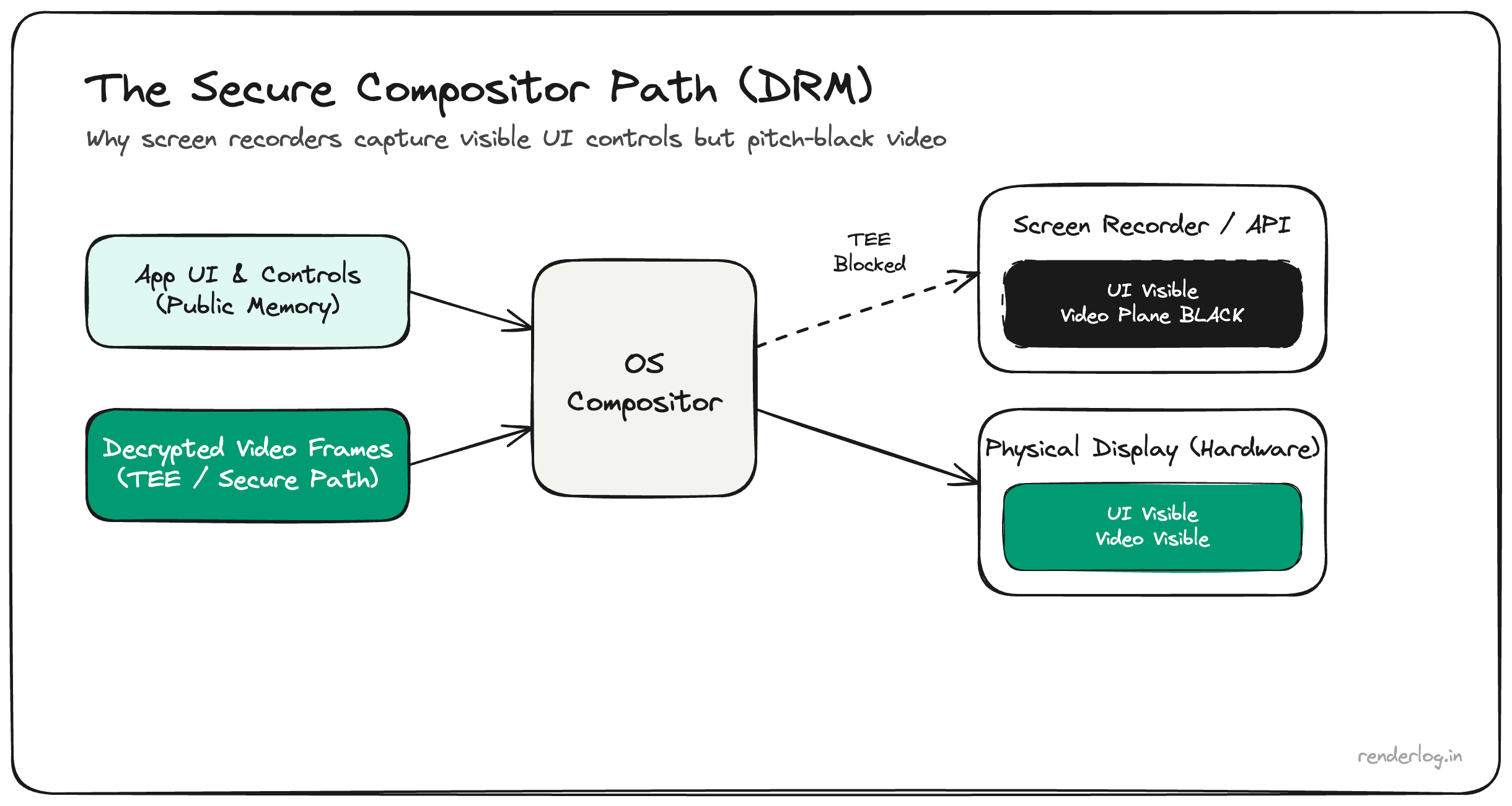
What you are actually seeing
Screen capture reads from the composition path the OS exposes to recorders and mirroring tools. DRM-protected premium video is composited through a protected surface: the decoder and GPU cooperate so that plaintext frames either never land in CPU-accessible buffers, or are flagged so capture returns empty, black, or static for that layer only.
That is why screenshots sometimes show UI perfectly while the video rectangle is blank, exactly the behavior you see in the split image above.
Web playback: Encrypted Media Extensions (EME)
In the browser, EME is the W3C API surface that connects JavaScript to a CDM. Your app:
- Receives encrypted media (often CENC or vendor-specific packaging).
- Uses EME to create
MediaKeyssessions and exchange license data with a license server. - Never receives decrypted samples as ordinary
ArrayBufferobjects in page memory.
The browser negotiates with the CDM, a sandboxed or vendor component, depending on OS and Widevine level. Decryption and key material stay on the CDM side of the boundary; the page just drives playback. Your JavaScript code never “gets” raw frames in a way that can be copied to canvas or piped to a recorder without violating the security model.
Native apps like JioHotstar use the same conceptual split (Android MediaDrm and Widevine-class stacks), not the DOM API literally, but the same job: keys and decryption happen outside normal app memory.
Content Decryption Modules and Widevine levels
A CDM (for example Google Widevine) implements license handling and decryption policy. Implementations are graded: conceptually L3 software vs L1 hardware on many devices:
- L3: Software CDM. Decode runs without strong TEE binding. Studios often cap resolution at 720p or 1080p for L3-only clients.
- L1: Hardware-backed. Keys and decode touch secure silicon paths designed to resist exfiltration. 4K HDR titles typically require L1.
That stack exists because broadcast and studio deals are priced on windowing and anti-redistribution. The client is treated as hostile; DRM is the contractual and technical compromise that lets live sports and premium content stream on commodity hardware at all.
Phones, TEE, and the black rectangle in screen recorders
On many modern phones, a high Widevine level ties decoding and output to a trusted path: a TEE or similar isolation holds key operations so the main OS cannot read protected plane pixels like a normal texture. When Screen Record requests frame data, the compositor omits or masks that layer. You see black, while unprotected UI layers (status bar, player controls) composite normally.
This is not a bug in your screen recorder. It is working as designed for rights-managed content.
Honest limits
- DRM raises the bar for casual HD ripping from client devices. It does not make piracy mathematically impossible; attacks shift to HDMI re-encode, CAM rips, leaks from insider sources, etc.
- Policies differ by platform, title, and studio rules. Some tiers allow limited mirroring on approved receivers.
- Fair use and accessibility debates are legal and product questions, not something a pipeline diagram settles.
Takeaway
JioHotstar and similar services go black on capture because decrypted video is routed through a DRM-controlled path (EME/CDM on the web, MediaDrm/Widevine-class stacks on device) so the OS-level share or record surface never receives those pixels. Controls stay visible because they are ordinary UI, not the protected media plane.
Understanding that split turns a confusing UX moment into a predictable security boundary: the invisible wall between licensed playback and uncontrolled redistribution.